Handed an unlabelled reel of LED tape, you can usually work out exactly what it is from the printings on the solder pads. This article explains how to read those pads to identify the supply voltage, whether the strip is addressable, and which control protocol it expects, using the reference drawing below.
The identification drawing
Each row shows a common strip construction together with the pad printings you will find at the cut points. Pay close attention to the pad labels; they are the most reliable identifier on the strip.
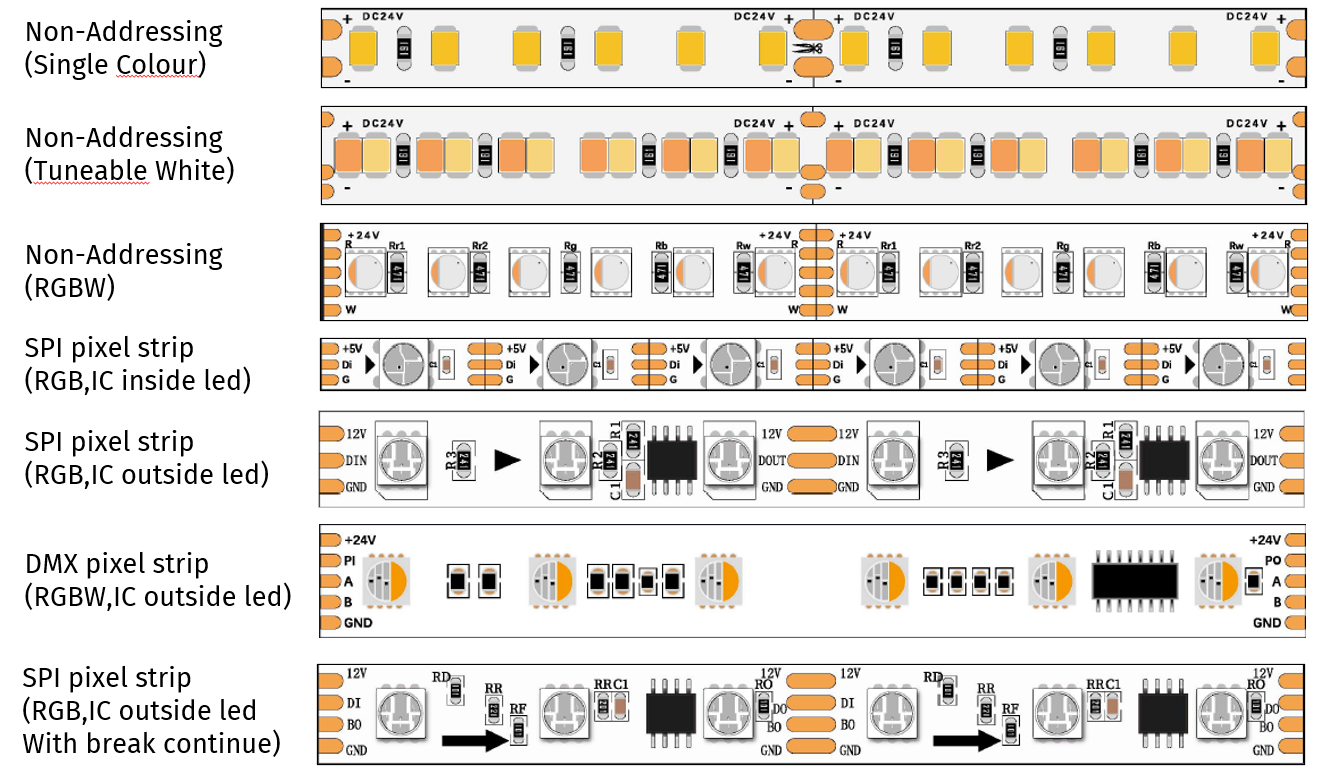
| Strip type | Typical pad printings | What it tells you |
|---|---|---|
| Non-addressing, single colour | + and - with a voltage marking (e.g. DC24V) | Constant voltage strip. Two pads only, the whole strip dims as one channel. |
| Non-addressing, tuneable white | + and - with a voltage marking, warm and cool LEDs alternating along the strip | Constant voltage strip with two white channels mixed to set colour temperature. |
| Non-addressing RGBW | +24V (or similar) plus R, G, B, W | Analogue colour strip. One pad per colour, common power rail, no per-pixel control. |
| SPI pixel strip, IC inside the LED | +5V, Di, G | Addressable strip. The driver IC is built into each LED package, so no separate chips are visible between LEDs. |
| SPI pixel strip, IC outside the LED | 12V, DIN, GND on one end and 12V, DOUT, GND on the other, with a visible IC between LEDs | Addressable strip with an external driver IC. These often drive several LEDs as one pixel group. |
| DMX pixel strip | +24V, A, B, GND | Controlled directly by DMX512. A and B are the RS-485 data pair, so it connects to a DMX output, not an SPI pixel output. |
| SPI pixel strip with backup data | 12V, DI, BI (or BO at the output end), GND | Addressable strip with a break-continue backup data line, such as the WS2815 family. Data can carry on past a damaged or removed pixel. |
How to identify a strip step by step
- Read the voltage printing. Most strips print the supply voltage directly on the PCB (DC24V, 12V, +5V). Never guess this; connecting a 5 V strip to 24 V destroys it. If you are choosing between voltages for a new project, see 5V vs 12V vs 24V Pixel Tape: How to Choose.
- Count the pads at a cut point. Two pads means single colour. A pad per colour (R, G, B, W) with a shared power pad means non-addressing analogue colour strip. Any pad labelled with a data name means the strip is addressable.
- Look for a data pad. DI, Di, DIN or DATA identifies an SPI (pixel) strip. A and B identify a DMX512 strip. If there is a clock pad (CLK or CI) the strip uses a clocked protocol such as APA102 and needs a controller that outputs clock as well as data.
- Look between the LEDs. If you can see small IC chips on the strip separate from the LEDs, the driver is external and the strip may address several LEDs as one pixel group. If there are no separate chips, the IC is inside each LED package and the strip is usually true per-pixel.
- Check the direction. Addressable strips carry data in one direction only, usually marked with arrows and with IN/OUT pad names (DIN in, DOUT out). The controller must feed the input end. Power, by contrast, is non-directional on pixel strip.
What the common pad labels mean
- + / - , VCC, GND, 0V: power pads. VCC is the positive supply rail, GND (0V) the return.
- DI / DIN, DO / DOUT: SPI data in and data out. Connect the controller to the data-in end.
- BI / BO: backup data in and out. Found on break-continue strips (for example WS2815 based tape); the backup line lets data bypass a failed pixel. It can be spliced to the same controller output as the main data line.
- CLK / CI: clock line on clocked protocols. Data and clock carry different signals, so you cannot splice one controller data output to both pads.
- A / B: the DMX512 differential pair on DMX-native strip.
- R, G, B, W: per-colour channels on non-addressing strip, one constant voltage dimmer channel per colour.
Matching the strip to a controller
Once identified, the strip type determines the controller family: non-addressing strips need constant voltage dimming channels, SPI strips need a pixel controller, and DMX strips connect to any DMX512 output. For the terminal-by-terminal wiring detail, including 4-wire backup data and clocked protocols, see Pixel Strip: Controlling Different Types. For configuring SPI tape on an ENTTEC pixel controller, see Configuring LED Tape With Octo & ELM, and before cutting or soldering to those pads, read Pixel Strip: Cutting, Soldering and Connectors.
If you are new to addressable LEDs and want the background first, start with Pixel: What are Pixel LEDs?