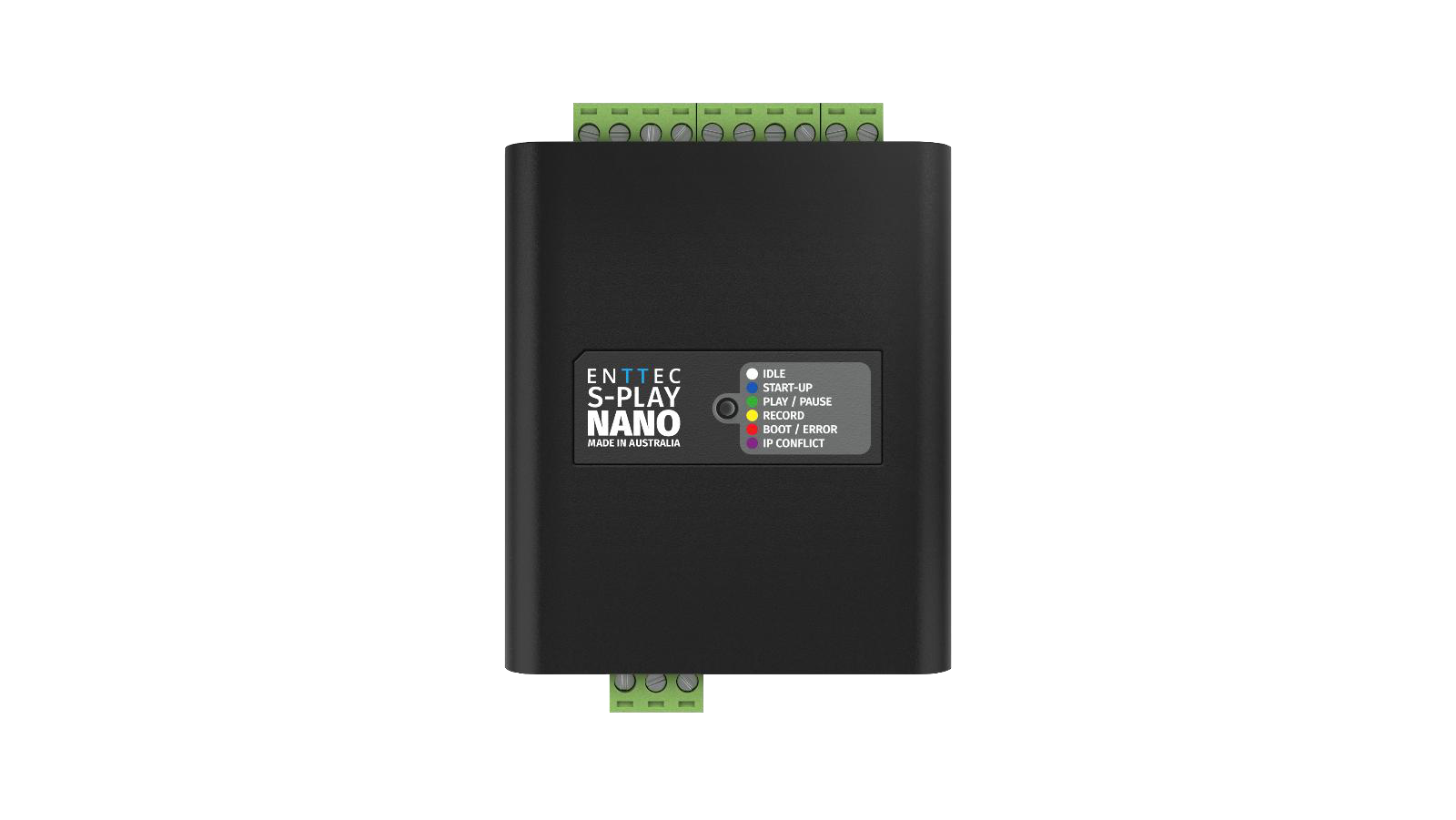
Create, Record, Edit and Play 1 DMX Universe light shows integrating with 3rd party hardware and systems in a compact 4 DIN module width form factor.
⚠️ Safety
Ensure you are familiarised with all key information within this guide and other relevant ENTTEC documentation before specifying, installing, or operating an ENTTEC device. If you are in any doubt about system safety, or you plan to install ENTTEC device in a configuration that is not covered within this guide, contact ENTTEC or your ENTTEC supplier for assistance.
⚠️ Heads up: ENTTEC’s return to base warranty for this product does not cover damage caused by inappropriate use, application, or modification to the product.
⚡ Electrical Safety
- This product must be installed in accordance with applicable national and local electrical and construction codes by a person familiar with the construction and operation of the product and the hazards involved. Failure to comply with the following installation instructions may result in death or serious injury.
- Do not exceed the ratings and limitations defined in the product datasheet or this document. Exceeding can cause damage to the device, risk of fire and electrical faults.
- Ensure that no part of the installation is or can be connected to power until all connections and work is complete.
- Before applying power to your installation, ensure your installation follows the guidance within this document. Including checking that all power distribution equipment and cables are in perfect condition and rated for the current requirements of all connected devices and factor in overhead and verify that it is appropriately fused and voltage is compatible.
- Remove power from your installation immediately if any accessory power cable or connector is in any way damaged, defective, shows signs of overheating or is wet.
- Provide a means of locking out power to your installation for system servicing, cleaning and maintenance. Remove power from this product when it is not in use.
- Ensure your installation is protected from short circuits and overcurrent. Loose wires around this device whilst in operation, this could result in short circuiting.
- Do not over stretch cabling to the device’s connectors and ensure that cabling does not exert force on the PCB.
- Do not ‘hot swap’ or ‘hot plug’ power to the device or its accessories.
- Do not connect any of this device’s V- (GND) connectors to earth.
- Do not connect this device to a dimmer pack or mains electricity.
⚠️ System Planning and Specification
- To contribute to an optimal operating temperature, where possible keep this device out of direct sunlight.
- Any twisted pair, 120ohm, shielded EIA-485 cable is suitable to transmit DMX512 data to or from the S-PLAY NANO. The DMX cable should be suitable for EIA-485 (RS-485) with one or more low capacitance twisted pairs, with overall braid and foil shielding. Conductors should be 24 AWG (7/0.2) or larger for mechanical strength and to Minimise volt drop on long lines.
- A maximum of 32 devices should be used on a DMX line before re-generating the signal using a DMX buffer/repeater/splitter.
- Always terminate DMX chains using a 120Ohm resistor to stop signal degradation or data bounce-back.
- The maximum recommended DMX cable run is 300m (984ft). ENTTEC advises against running data cabling close to sources of electromagnetic interference (EMF) i.e., mains power cabling / air conditioning units.
- This device has an IP20 rating and is not designed to be exposed to moisture or condensing humidity.
- Ensure this device is operated within the specified ranges within its product datasheet.
⚠️ Protection from Injury During Installation
- Installation of this product must be performed by qualified personnel. If ever unsure always consult a professional.
- Always work with a plan of the installation that respects all system limitations as defined within this guide and product datasheet.
- Keep the S-PLAY NANO and its accessories in its protective packaging until final installation.
- Note the serial number of each S-PLAY NANO and add it to your layout plan for future reference when servicing.
- All network cabling should be terminated with an RJ45 connector in accordance with the T-568B standard.
- Always use suitable personal protective equipment when installing ENTTEC products.
- Once installation is completed, check that all hardware and components are securely in place and fastened to supporting structures if applicable.
⚠️ Installation Safety Guidelines
- The device is convection cooled, ensure it receives sufficient airflow so heat can be dissipated.
- Do not cover the device with insulating material of any kind.
- Do not operate the device if the ambient temperature exceeds that stated in the device specifications.
- Do not cover or enclose the device without a suitable and proven method of dissipating heat.
- Do not install the device in damp or wet environments.
- Do not modify the device hardware in any way.
- Do not use the device if you see any signs of damage.
- Do not handle the device in an energised state.
- Do not crush or clamp the device during installation.
- Do not pull power from the device whilst in operation.
- Do not sign off a system without ensuring all cabling to the device and accessories has been appropriately restrained, secured and is not under tension.
Application Diagram
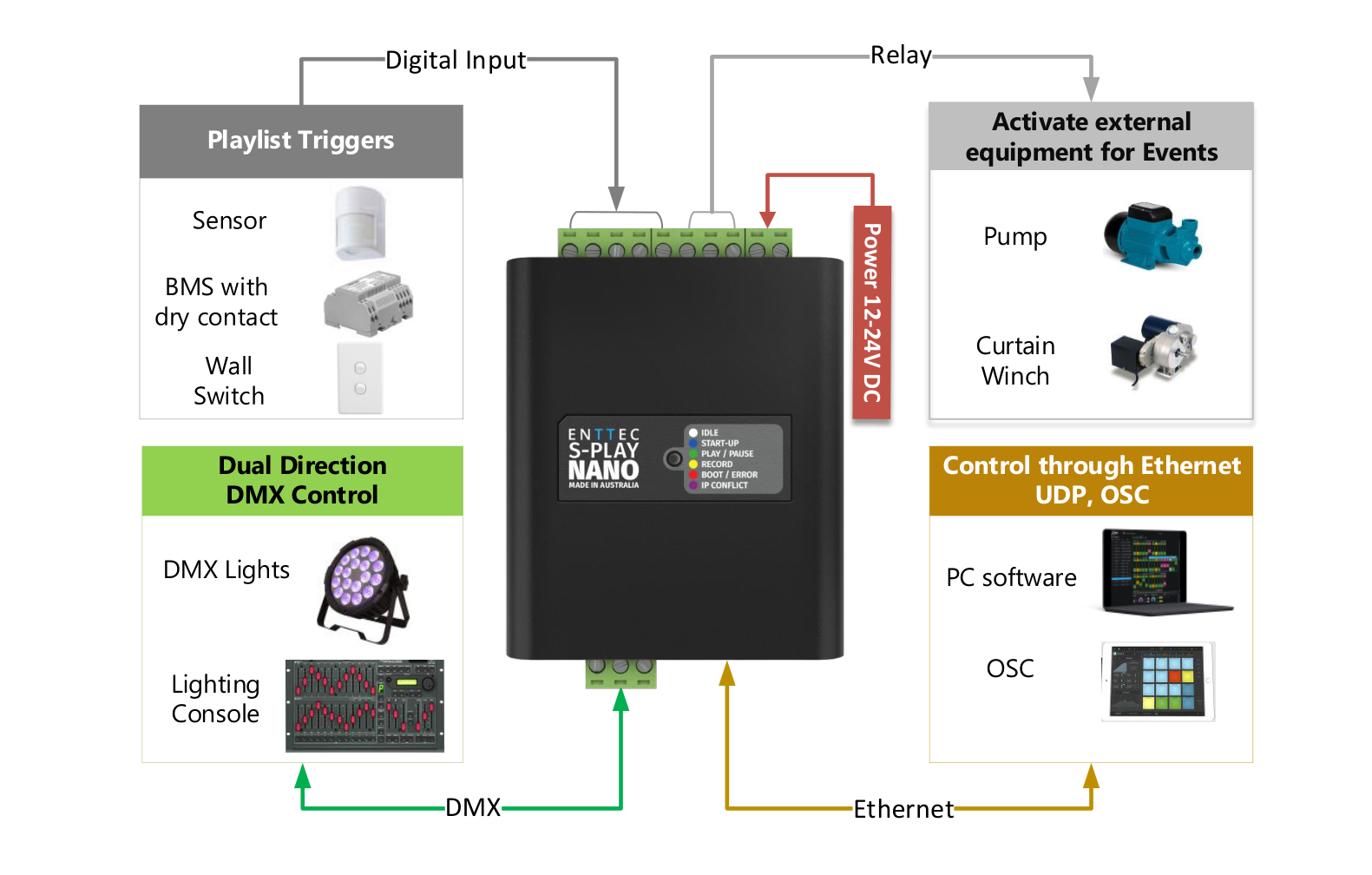
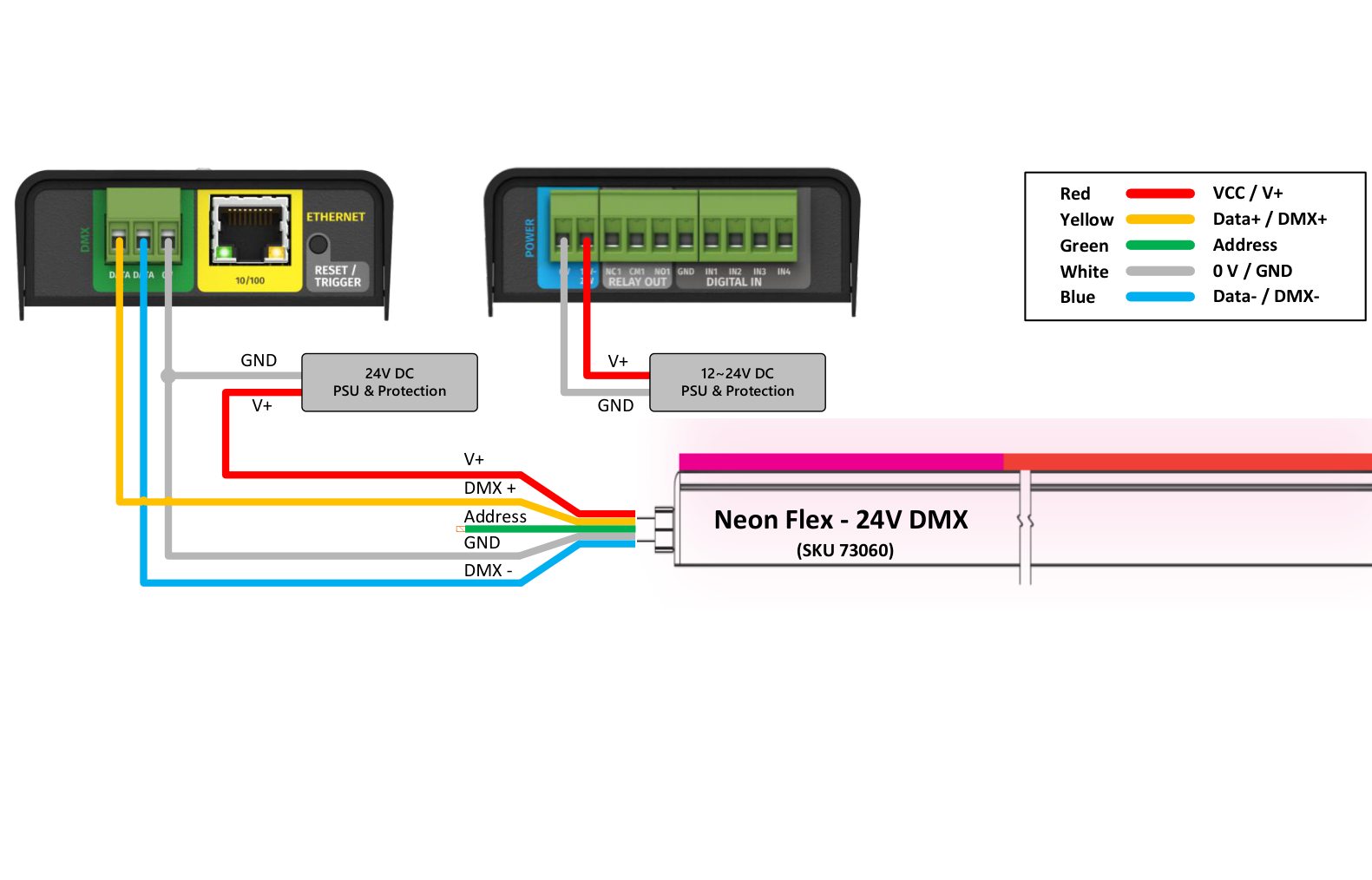
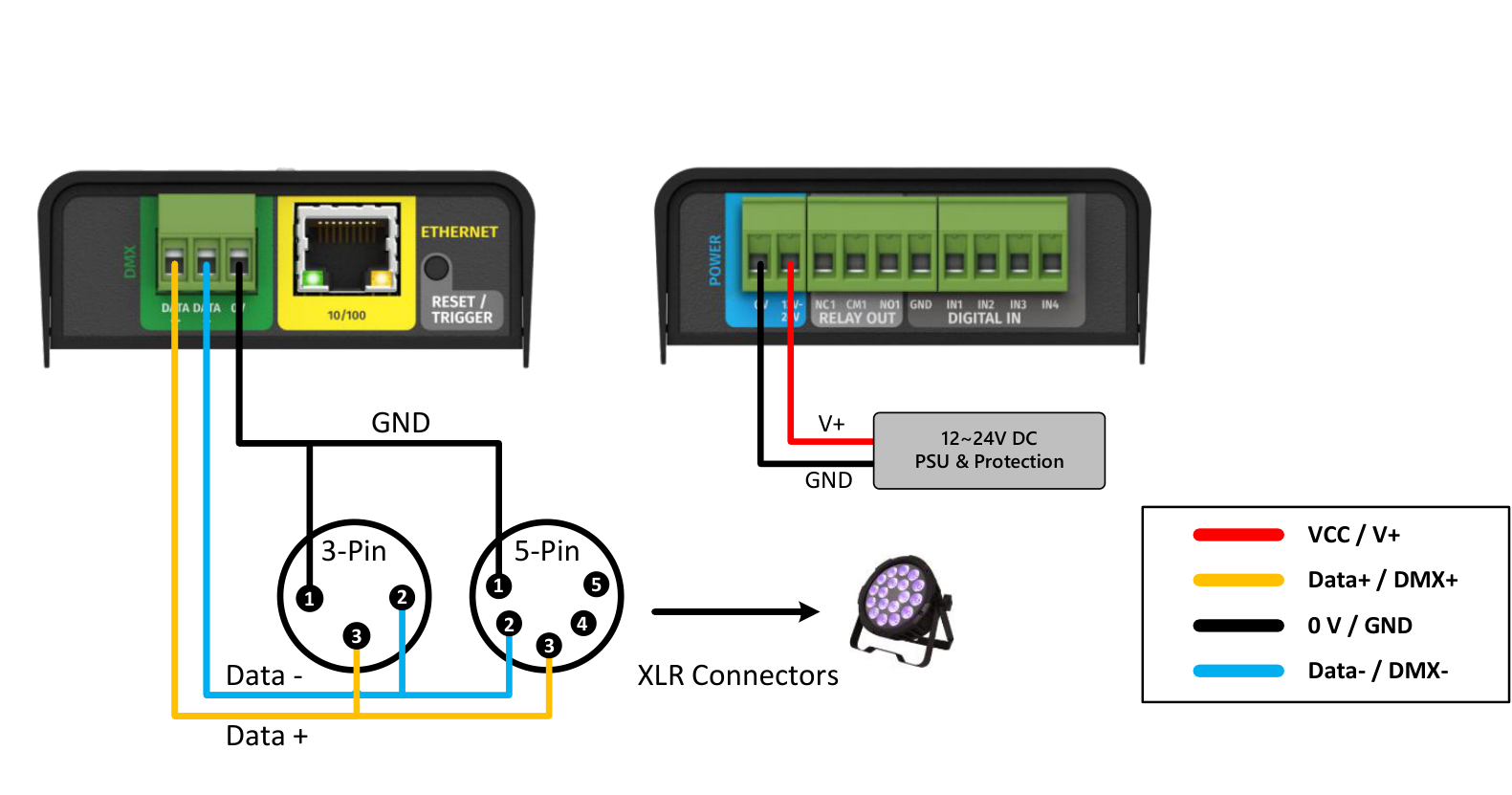
Wiring Diagram
Connection to DMX Neon Flex
Connection to DMX XLR Connector
Connection to Relay
The S-PLAY NANO is equipped with a relay designed for use with low power devices and to provide switching logic for higher power contactors.
To ensure a safe installation it is imperative that the power connected to the S-PLAY NANO’s relays is within their operating limits.
The S-PLAY NANO’s relay specifications are as follows:
| Maximum Current Rating | 2A |
| Maximum Voltage Rating | 50V DC |
| Total switchable power of each S-PLAY NANO relay | 60W |
To calculate to total power your circuit will pass through the relay, multiply the circuit voltage by the current you intend to pass through it. This value must be lower than 60W. In other words, Voltage x Current ≤ 60W.
| Example 1 | Example 2 | Example 3 | |
|---|---|---|---|
| Current | 1.2A | 2A | 2A |
| Voltage | 50V | 30V | 50V |
| Maximum Power | 60W | 60W | 100W |
If your application requires main power switching or high current applications, ENTTEC recommends the use of a DMX switch pack controlled by the S-PLAY NANO’s DMX output or wire the S-PLAY NANO’s relay outputs to connect to the primary coil of a DIN mount high powered relay or contactor.
Connection to Digital Inputs
The S-PLAY NANO’s digital inputs detect circuit completion to the S-PLAY NANO’s ‘GND’ (V- terminal) to send triggers.
- The maximum resistance of a cable that can be used to connect to a Digital Input to the S-PLAY NANO’s GND is 20 Ohms.
- ENTTEC recommends a total maximum wire length of 100m. (50m total distance from the S-PLAY NANO in a loop).
- The longer the cable, the higher its capacitance and likelihood of interference from EMF (Electro Magnetic Interference).
- To ensure a reliable trigger when creating a system, contact should be made for 3 seconds when triggering a digital input.
⚠️ Note: Always run digital input cabling away from main power or high sources of EMI (i.e. air conditioning units) to reduce interference.
If you require a remote input trigger further away from the S-PLAY NANO than 50m, ENTTEC recommend the use of a 3rd party GPIO interface that can communicate with the S-PLAY NANO’s other triggering methods over a network.
Using Motion Sensors with the S-PLAY NANO

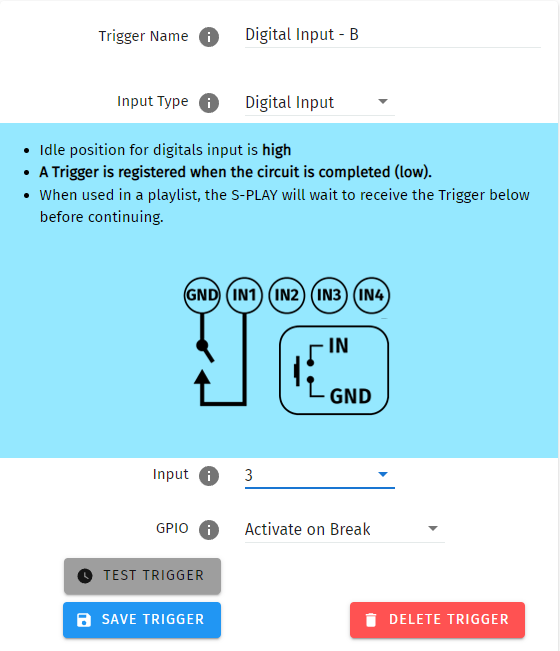
- Connect the sensor output to one of the Digital Input ports (IN1 to IN4) in S-PLAY NANO.
- Connect 0V (GND) from sensor to GND of Digital Input connectors in S-PLAY NANO.
- Go to web interface:
- Go to Triggers.
- Create a new entry.
- Select Digital Input from Type
- Change to Port 3 in “Ports” (or to the corresponding port the OUT cable was connected to).
- You can use the Test Trigger option to ensure functionality.
- Click on Save Trigger for it to be saved ready for use on the Playlists page.
- Navigate to the Playlists Page.
- The Trigger can be selected as a ‘Start Trigger’ to commence playback of a certain playlist and/or dragged onto the timeline to act as a condition that must be met for playback to continue.
Functional Features
Overview
- Supports DMX Output and live recording.
- Max output refresh rate 40 FPS.
Record Cues or Create Effects
- Record/edit up to 4 Static, Dynamic or Effect Cues.
- Preview Cues being created.
- Monitor the DMX values of Cues while recording.
- On board gradient Effect Cue generator.
Create and playback Playlist Integrating External Hardware
- Create up to 4 playlists using the intuitive timeline editor.
- HTP merge between playlists.
- Fade out on Stop command.
- Hold last value on pause.
- Support up to 4 Events through options: UDP, OSC, Relay.
- Create up to 8 remote Triggers through options: UDP, OSC, Digital Input (GPI) and Button.
- Playback on power up with preferred loop times.
- OSC API.
Management and Support
- Easily accessible web interface for account management.
- Lock out edit functionality using a password.
- Allow backup and restore S-PLAY NANO state.
- Upgradable firmware to S-PLAY MINI for enhanced functionality.
Hardware Features
Overview
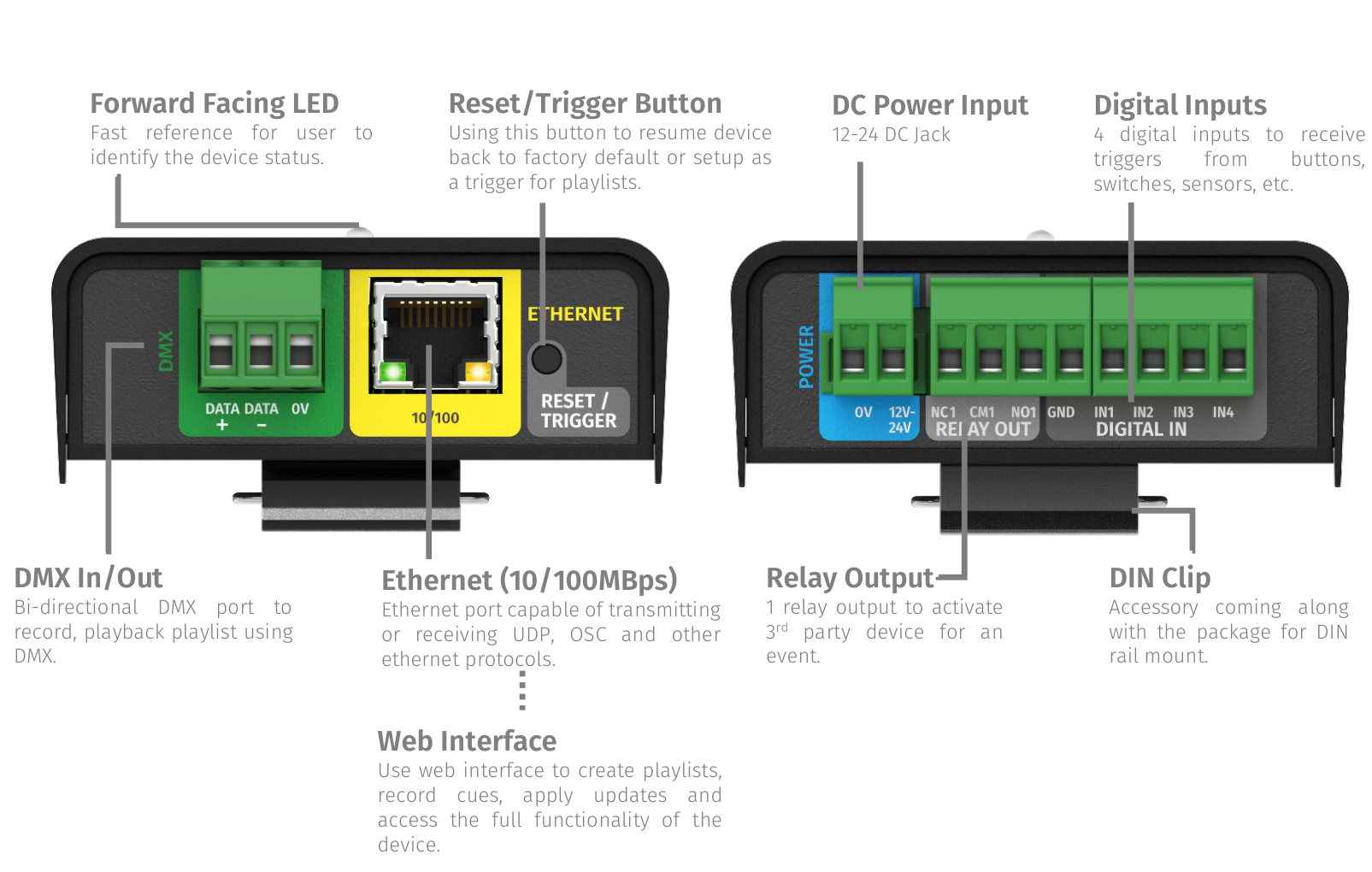
- 4-DIN-module width unit form factor.
- One bi-directional 3-Pin Phoenix DMX Port.
- 12 to 24v DC Input
- 100 Mbps Ethernet RJ45 Port with built-in Link and Activity LED Indicator.
- 4 Digital Inputs (GPI).
- 1 Relay output (NC, NO, COM).
- Full electrical isolation of up to 1500V.
- Polarity protection.
S-PLAY NANO Connectivity
LED Indicator
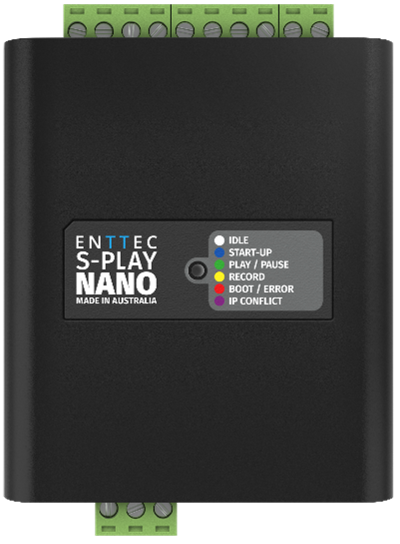
The LED status indicator is used to determine the S-PLAY NANO’s current state:
| LED Colour | S-PLAY NANO Status |
|---|---|
| White | Idle |
| Blue | Device starting up |
| Green | Play/Pause |
| Yellow | Record |
| Red | Boot/Error |
| Purple | IP Conflict |
| Flashing Red and Blue | Updating firmware |
| Flashing Red | On Reset/Trigger button press |
Reset Button
The reset button on the device providing multiple control options and ensuring the device's adaptability to various operational scenarios.
This reset button gives access to the functionalities below:
Trigger Playlists
The reset button can be configured as a trigger button for playlists. Detail settings see Trigger section in this document.
Boot Loading
This function assists to restore or recover the device's firmware to a stable state. This can be performed by following steps:
- Press and hold the reset button while powering up the unit.
- Continue holding and release the button within 10 seconds of powering up.
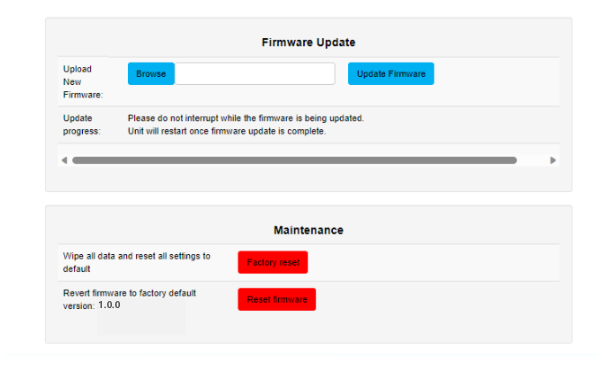
- The unit will load the boot and the web interface will be redirected to the boot page. Manually refresh the page if needed.
- On this page, users can choose to upload a firmware file, perform a factory reset at the current firmware version, or revert to the factory-state firmware.
Reset Network Configuration
In case of IP conflicts or network issues, follow these steps to reset the network configuration to default (DHCP enabled with fallback IP 192.168.0.10):
- Press and hold the reset button while powering up.
- Continue holding for 10 seconds until the LED turns Green.
- The device will restart automatically.
- The network settings will be reset to default.
Resume Factory Default
In specific situations, a factory reset might be necessary. This action reverts the device to its initial manufacturer settings, erasing all data and custom configurations:
- Press and hold the reset button while powering up.
- Continue holding for 20 seconds until the LED turns Yellow.
- The device will restart automatically.
- All settings will be reset to the initial state.
Out of the Box
Out of the box, the S-PLAY NANO is factory configured to:
- Output Settings: DMX
- DHCP: Enabled
- Static IP: 192.168.0.10
- Netmask: 255.255.255.0
- UDP Input Port: 5000
- OSC Input Port: 8000
- DMX Refresh Rate: 40 FPS
- Send Black Frame when all playlists stopped: Enabled
- Restrict to one active playlist per Group: Disabled.
Networking
The S-PLAY NANO has DHCP IP address enabled by default.
DHCP: When DHCP is enabled, and the S-PLAY NANO is on a network with a DHCP server, it requests an IP address on power-up. If the DHCP server is slow or absent, the S-PLAY NANO falls back to the default IP address: 192.168.0.10 with a netmask of 255.255.255.0.
Static IP: When DHCP is disabled, the default Static IP becomes the communication address. Adjust network settings, including Static or DHCP, Netmask, and Gateway within the Settings page on the S-PLAY NANO’s web interface. Remember to note the changed Static IP after modification in the web interface.
⚠️ Note: When configuring multiple devices on a Static network, ENTTEC recommends connecting one device at a time to the network and configuring a unique IP to avoid IP conflicts.
When the S-PLAY NANO is set to a static IP, the default gateway MUST be the same for both the S-PLAY NANO and your computer for EMU to discover the S-PLAY NANO.
Web interface
The S-PLAY NANO offers easy configuration and control through a web browser on any computer within the same Local Area Network (LAN) as the device. Users can directly type the IP address into the web browser's URL field, whether the S-PLAY NANO is assigned an address by a DHCP server (Dynamic Host Configuration Protocol) or uses a Static IP address.
To discover the S-PLAY NANO's IP address using ENTTEC EMU software, follow these steps:
- Download EMU from www.enttec.com/sku/70680. (Available for Windows and macOS)
- Physically connect the S-PLAY NANO to the computer using an Ethernet cable, either directly or through the same network (or router).
- Open EMU, access the Settings in the top right corner, and go to the Output tab. Here, you can 'Rescan for Devices' and wait until EMU finds the S-PLAY NANO as well as any other supported ENTTEC device on the network.
- Once found, select 'S-PLAY NANO' and press the configuration cog to be directed to your S-PLAY NANO’s Web interface.
Alternatively, use the following methods to discover the IP address:
- An IP scanning software application (i.e. Angry IP Scanner) can be run on the local network to return a list of active devices on a local network.
- Devices can be discovered using Art Poll (i.e. DMX Workshop if set to use Art-Net).
- The device default IP address 192.168.0.10 is printed on the physical label on the product when DHCP server is not available.
Top Menu
The S-PLAY NANO’s web interface consists of the following pages:

Home
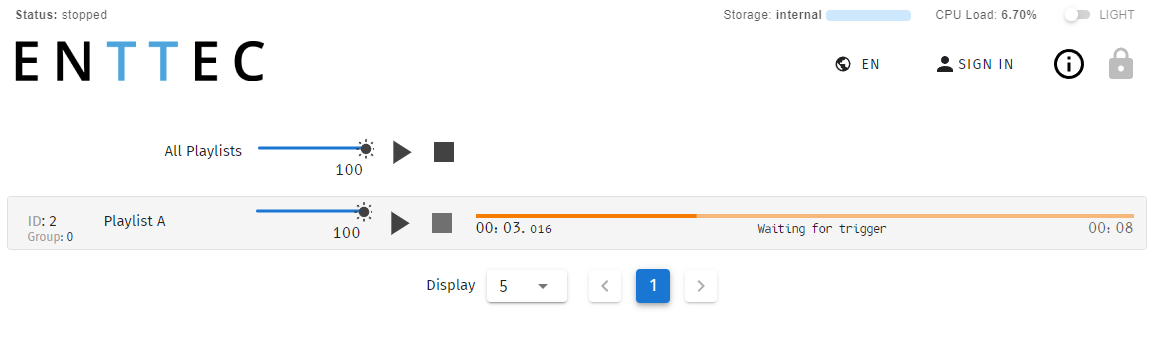
The Home page which is the default landing page presents an overview of all playback activities going on the S-PLAY NANO.
When used in combination with the lock function, the homepage can be used to as a system page for the end users to view all playlists:
Playlists
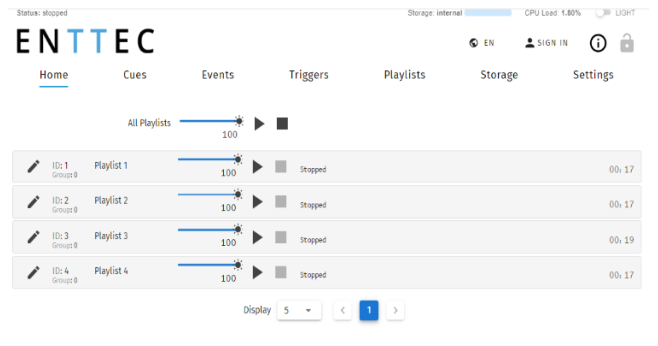
- View/Set intensity for all Playlists
- Play/Pause all Playlists
- Stop all Playlists
- Play individual Playlist
- Pause individual Playlist
- Stop individual Playlist
- View/Set intensity individual Playlist
- View/Set progress individual Playlist
⚠️ Note: Playlists can be hidden from the home page by selecting the ‘Hide from Home’ option on each of their configuration pages.
Cue
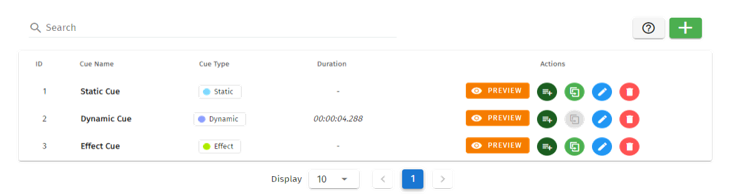
S-PLAY NANO allows a maximum of 4 cues created from a combination of Static, Dynamic and Effect Cues. The dedicated Cue page offers an array of functionalities, allowing cues to be easily configured, duplicated, edited, and previewed before building into a playlist.
3 key types of cues that can be created by using the green + icon:
- Static: A lighting state of 1 DMX Universe. DMX data can be user-defined values or a snapshot of the incoming DMX frame. This can be incorporated into a playlist with applied fade-in/out times.
- Dynamic: A recording of 1 DMX Universe of lighting control data within a specified time frame. The S-PLAY NANO allows a perfect loop when recording over a user-defined period.
- Effect: Capable of creating a gradient effect within the S-PLAY NANO without the need for a physical DMX source or lighting design software.
Managing Cues
All cues can be ordered by ID, Cue Name, Cue Type & Duration. Preview, Duplicate Edit or Delete Static or Effect Cues from this view.
 | Directly turn a Cue into a Playlist |
 | Duplicate Cue |
 | Edit Cue name and channel values after a cue has been created. |
 | Delete Cue |
 | Preview cues. Multiple cues can be previewed simultaneously. Actively playing cues will have a green "PREVIEW" buttons. To stop previewing, simply click on the green "PREVIEW" button. |
⚠️ Note: Dynamic recordings cannot be duplicated.
Editing it in the Cue Library directly overwrites the full universe values received and extends the length of the cue if necessary.
Once a cue is selected to be edited, the S-PLAY NANO will internally trigger the Stop All command to stop all playback on the S-PLAY NANO to stop overlapping.
Static Cue
The Static Cue can be generated by either capturing DMX snapshot from DMX port or using the inbuilt editor to define DMX value manually.
Follow the instructions below to create static cue at your preferred methods.
- Click the green icon + and choose "Static" as the cue type to open the Static cue editor window.
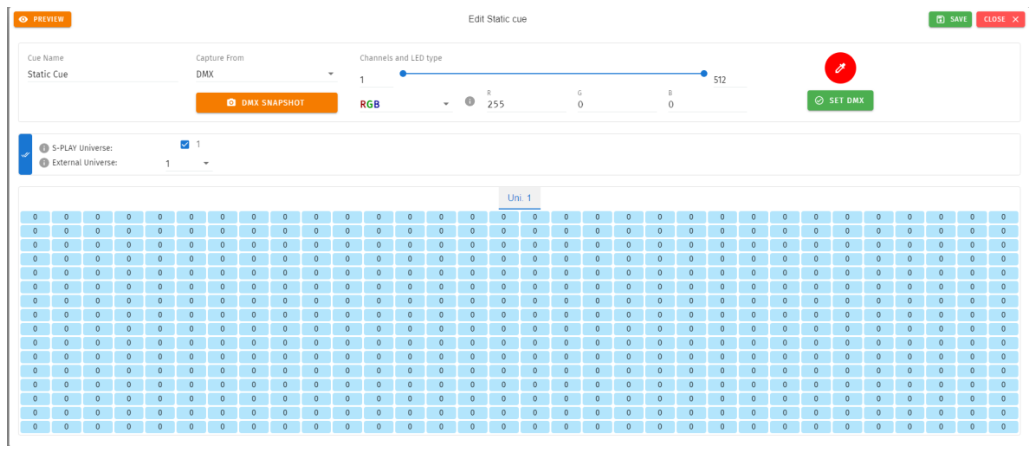
- Start by assigning a name to the cue for easy identification.
- Next, choose DMX as the source protocol and specify the desired channels to be utilised.
- There are 3 ways to define the channel value:
- Manually set individual channel values and press 'Set DMX' to populate the selected channels.

- Use the Colour Picker from the colour palette and press 'Set DMX' to apply and populate the selected channels.

- Capture a DMX frame from the selected DMX source connected to the S-play NANO by pressing the ‘DMX Snapshot’. It will automatically populate the recorded DMX values to the selected channels.

- Manually set individual channel values and press 'Set DMX' to populate the selected channels.
- If you wish to view the output live, press the ‘Preview’ button at the top left of the interface to send the recorded data to your connected DMX fixture.
- Save the cue once completed.
⚠️ Note: When setting single-channel or dimmer fixtures, choose 'All/W' for individual channel control.
Dynamic Cue
Dynamic Cues are recordings that allow DMX streams to be recorded and integrated into a show. Follow the instructions below to create a dynamic cue at your preferred methods.
- Click the green icon + and choose "Dynamic" as the cue type to open the Dynamic Cue editor window.
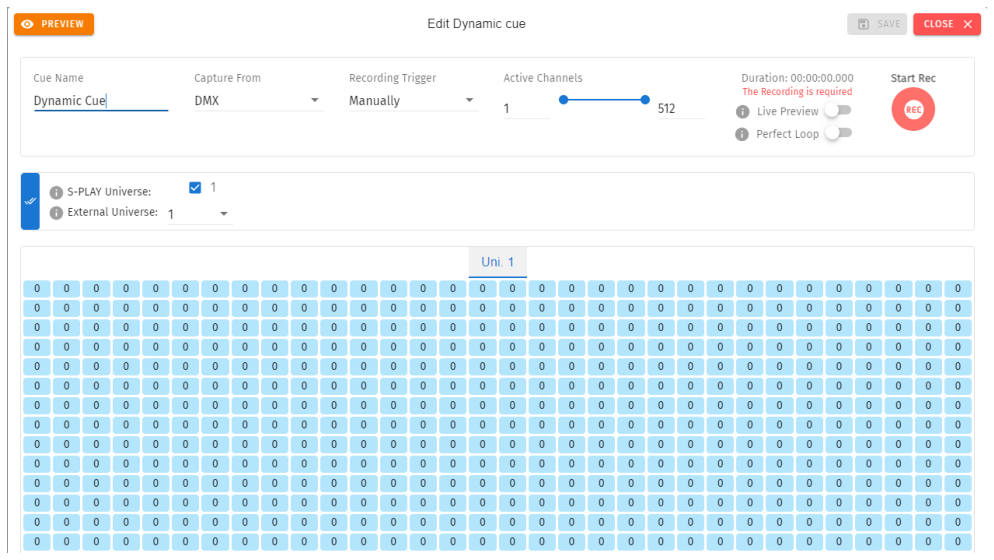
- Start by assigning a name to the cue for easy identification.
- Next, choose DMX as the source protocol and specify the desired channels to be utilised for the recording.
- There are 2 ways to record:
- Manual cue recording by clicking the red "Start Rec" button.
- Configure a Recording Trigger to precisely initiate and stop recording, enabling you to effortlessly capture a show using a remote trigger. Select recording triggers from the options below:
- OSC, UDP triggers start on message received and stop when same message received again.
- Digital Input: when configured as ‘Activate on Break’ - Recording starts when the connection between the Digital input port and GND is broken and stops when the connection is made. This is reversed when set to ‘Activate on Make’.
- Button: Reset/Trigger button on the device can be set to trigger the recording on press or release.
- Manual cue recording by clicking the red "Start Rec" button.
- If you are recording looped content, enable Perfect Loop to allow the S-PLAY to automatically stop recording when it detects a loop by matching the incoming frames with the first 10 frames of the recording.
- Once the recording is initiated, the timer in the top right of the window will start running as soon as data begins to be captured. The DMX values captured will be shown for their corresponding channels.
⚠️ Note: When recording live generated content, Perfect Loop may have inconsistent results due to the dynamic nature of the live content generation, where the exact same 10 frames may not always be generated.
Effect Cue
Effects in the S-PLAY NANO rely on a gradient, which makes it perfect whether fine-tuning a multitude of single channel dimmers or RGB/RGBW lights in 16 or 8bit variants. To create an Effect, press the green + icon and select Effect as the cue type to open the Effect editor window:
- Firstly, provide a cue name to aid identification.
- If you wish to view the output live whilst creating your effect, press the preview button at the top left of the interface to send the recorded data to your fixtures of your S-PLAY’s outputs as defined on the Settings page.
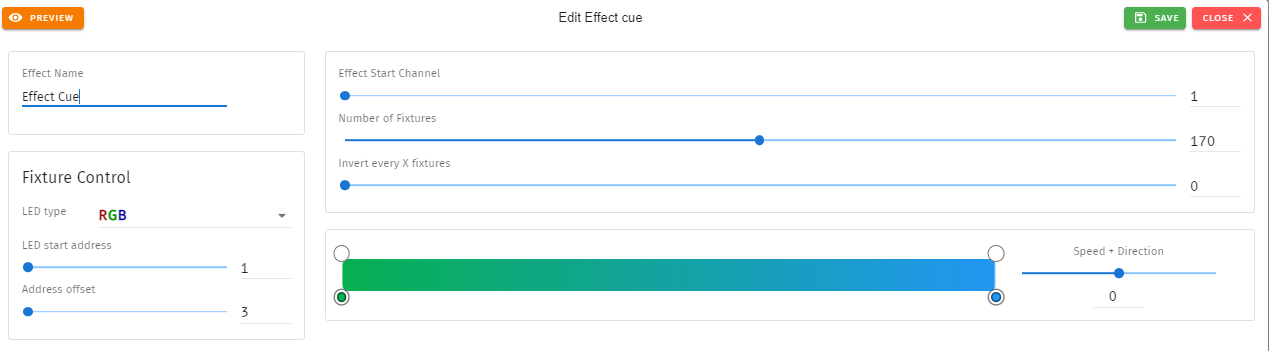
- In the Fixture Control section, users can define the LED type that the effect will reference and set the LED start address for the initial fixture (i.e., the DMX Start address of your first fixture). The Address Offset, referring to the required channel for the fixture, will be automatically populated.
- For example, if you have an 8-channel fixture where the first channels are intensity and strobe, and color begins from channel 3, you can set your address offset as 8 and the LED start channel as 3.
- This configuration ensures that the effect will play every 8 channels, starting from the 3rd channel.
- The Effect Start Channel defines the position (phase) where the the gradient will apply. The Number of Fixtures sets the number of the LEDs which will be included within the effect. By inverting the gradient direction after every defined number of fixtures, the Invert Every X Fixtures allows the creation of a grid of fixtures showing in a non-linear fashion (perfect for pixel tape projects!).
- By clicking on the gradient graphic, the user can modify and define the gradient colour at any point. Each colour point can be dragged to a position to create preferable effect. A maximum of 8 colours can be created for a Effect Cue in S-PLAY NANO. In order to create for smooth loops, ensure the beginning and end colour of the Effect are the same. The exact range of fixtures that the color point in the gradient graphic will affect can be counted based on Number of Fixtures and Position (%).
- This look can be saved as it is, or a speed and direction can be defined using the slider. (We strongly recommend using the preview option whilst doing this to ensure all is as you expect in the real world).

Events
The Events page allows:
- Create up to 4 custom Events, ready to be embedded in playlists.
- Send Events through: Relay, UDP and OSC.
- Editing, testing and deletion of Events.
Use events to allow integration between S-PLAY NANO and other devices by sending commands over UDP and OSC protocols and interacting with the relay.
UDP
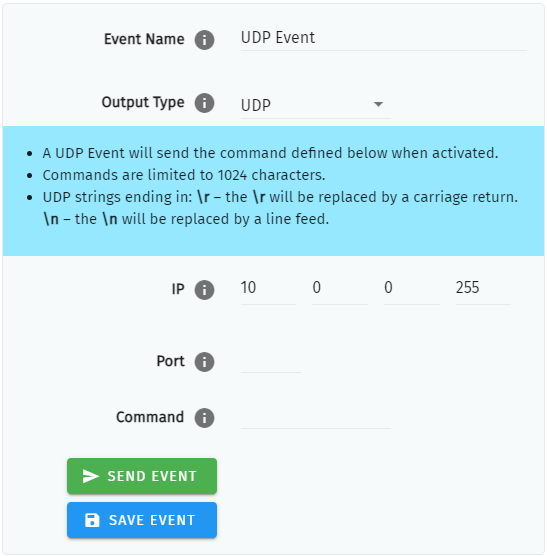
- A UDP Event will send the command defined below when activated.
- Commands are limited to 1024 characters.
- UDP strings ending in
\r– the\rwill be replaced by a carriage return. - UDP strings ending in
\n– the\nwill be replaced by a line feed.
OSC
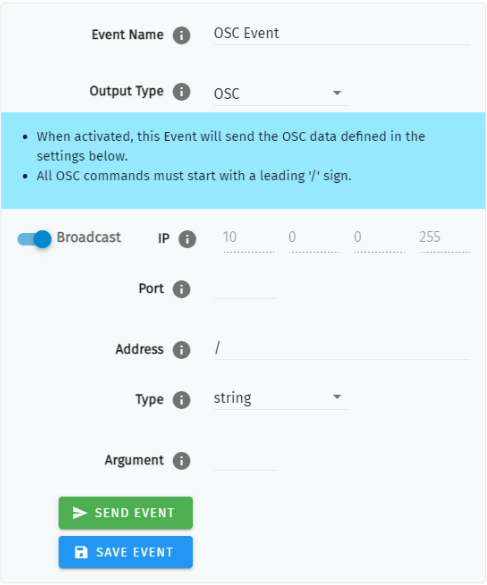
- When activated, this Event will send the OSC data defined in the settings.
- OSC Strings, Floats and Integers can be defined.
- All OSC addresses must start with a leading ‘/’ sign.
Relay
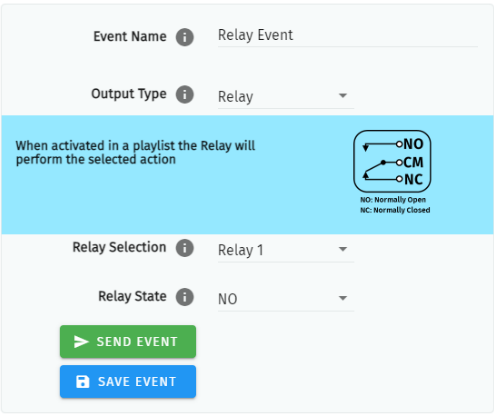
Control the relay action. When activated in a playlist the Relay will perform the selected action.
- NO: Normally Open
- NC: Normally Closed
⚠️ Note: On system power-up, the Relays position is set to be normally open.
Triggers
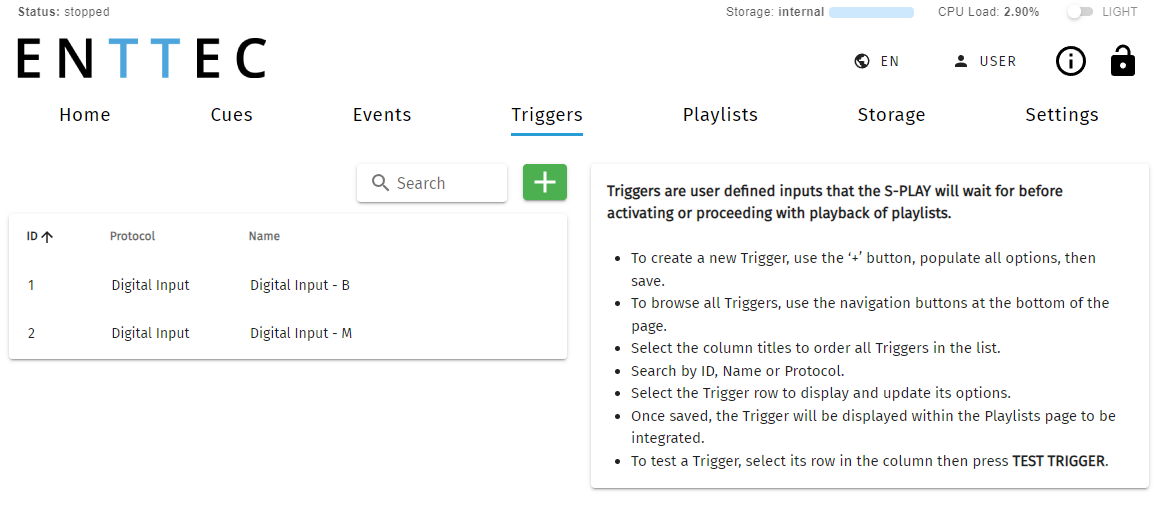
The Triggers page allows:
- Create up to 8 custom Triggers, ready to be embedded in playlists.
- Set receiving triggers from: digital input, UDP and OSC.
- Editing, testing and deletion of Triggers.
Utilise triggers to take control of the playlist timeline at any point. When a trigger is active, the timeline will pause until the selected trigger is active.
If a playlist is awaiting a trigger, it can be played by either activating the trigger or pressing the play button, ensuring complete playback control even when triggers are unavailable.
When creating new triggers, use the 'Test Trigger' option to send the trigger being created.
UDP
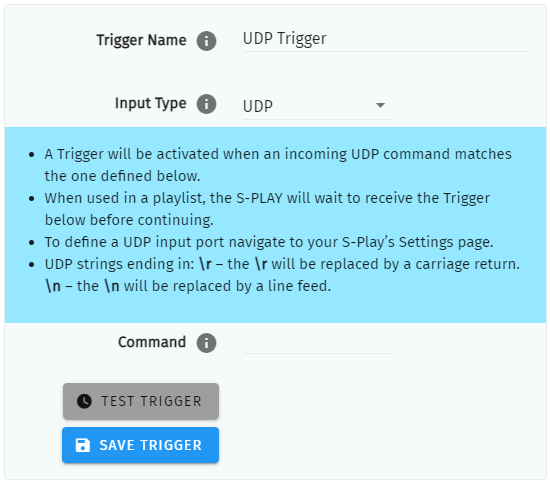
UDP communication settings:
- A Trigger will be activated when an incoming UDP command matches the one defined below.
- The command must be received upon the port defined within the Network Settings (default 5000).
- UDP strings ending in:
\r– the\rwill be replaced by a carriage return.\n– the\nwill be replaced by a line feed.
OSC
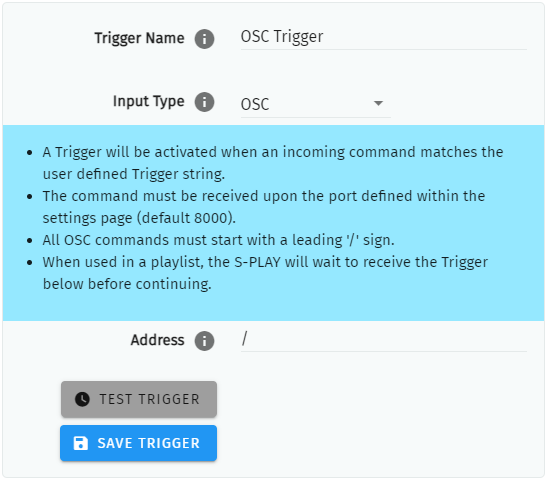
OSC communication settings:
- A Trigger will be activated when an incoming command matches the user defined Trigger string.
- The command must be received upon the port defined within the Network Settings (default 8000).
- All OSC commands must start with a leading '/' sign.
Digital Input
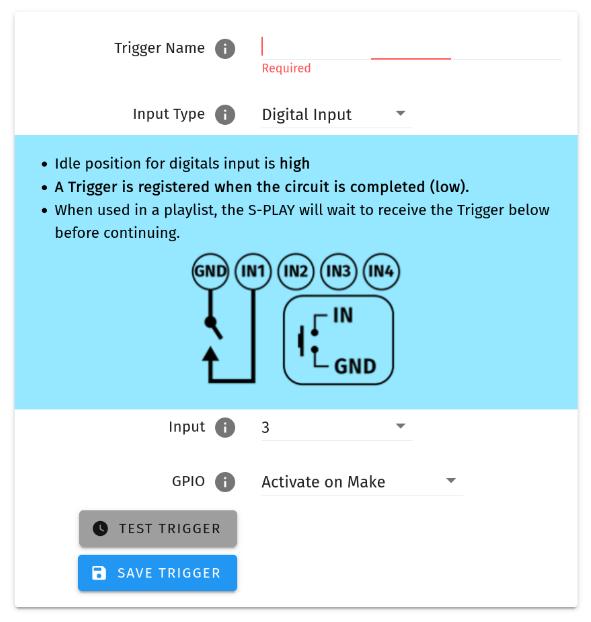
Use digital inputs with sensors, pressure pads, and wall switches to create an interactive installation.
S-PLAY NANO has 4 digital input ports to activate triggers.
- Idle position for digitals input is high.
- A Trigger is registered when the circuit is completed (low).
- If the input remains in a low position while the timeline goes over the trigger, the playlist won't pause.
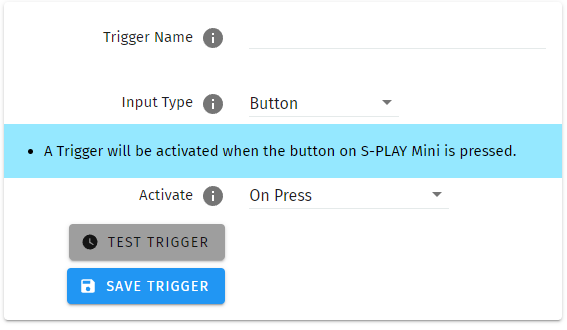
Button
S-PLAY NANO’s reset button can be configured as a trigger button to activate a playlist command.
- A Trigger will be activated when the button is on release or on press.
Playlists
The Playlists page is where playlists can be created by combining Cues, Events and Triggers using the timeline editor which allows:
- Create up to 4 playlists and play simultaneously.
- Edit, Rename and Delete Playlists.
- Access to all Playlists.
- Play, Pause and Stop Playlists.
- Re-order Playlists.
- Hide certain playlists from the home page.
- Define loops.
- Define fade time.
- Define start and stop triggers or to start from start up.
- Set Master intensity.
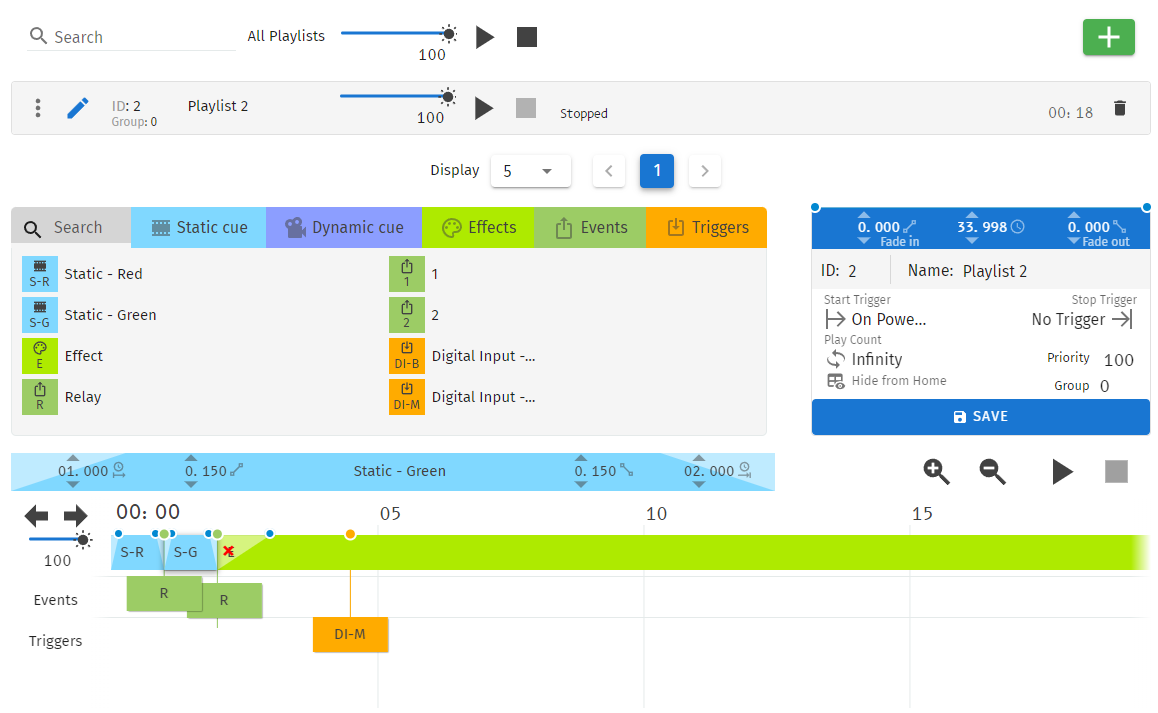
The playlist editor allows the user to add a maximum of 4 cues (static, dynamic or effect), 4 events and 4 triggers each in a sequence. These can be stored and played back at any given point.
⚠️ Top Tip: By default, cues on the timeline hold their end value on the output until a different scene is triggered. If you want to send a blackout at the end of a specific cue or timeline to all channels, set it to have a fade out time. If you require a snap to black instead of a fade out effect, set this fade out time to be 0.001 second.
Playlists Page Layout
The playlists page is comprised of 9 key elements:
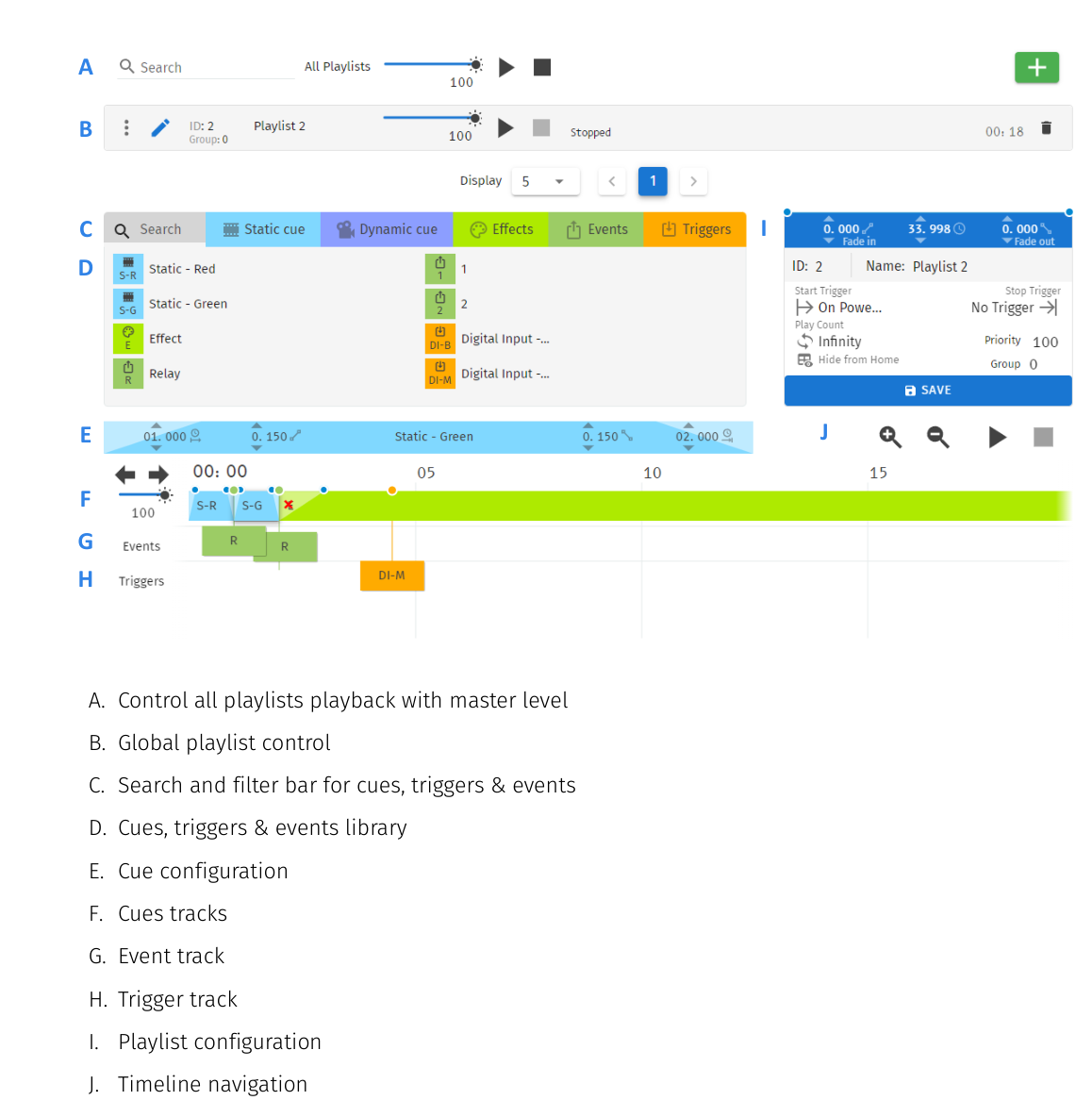
Created Playlists
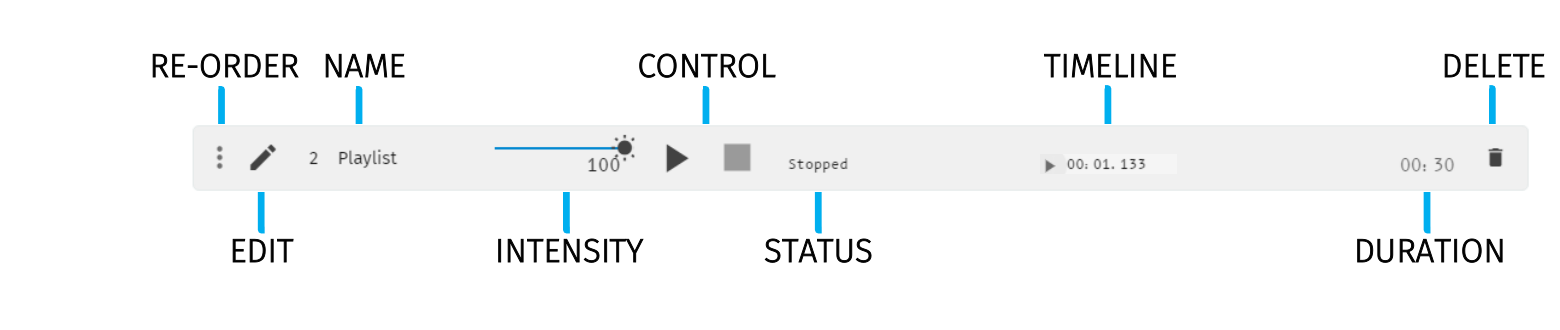
This section lists all the playlist created. The section displays basic information like the playlist name and duration and gives basic control over a playlist.
- Reorder: Drag and drop the playlist from the three dots rearranging your playlist (this will be reflected on the Home Page).
- Edit: Loads the playlist in the timeline and media tracks for editing
- Name: Displays the ID (set internally) and name of the playlist set in the Playlist Attribute section.
- Intensity: real-time control of the master intensity of the playlist. By default, it is set to 100% and it can be changed when the playlist is playing.
- Control - Play: Play the selected playlist, also the Playlist is loaded into the timeline and media track section.
- Control - Pause: Pause the selected playlist. By pausing a playlist, S-PLAY NANO holds the las DMX value.
- Control - Stop: Stops the selected playlist. By stopping a playlist, S-PLAY NANO stops outputting any data (set DMX value to 0).
- Status: Shows the status of the playlist. It can be: Playing, Paused, Stopped, Waiting for Trigger.
- Timeline and Duration: Shows the playback state of each playlist. Once the playlist has completed playing, it stops outputting data. Opacity of this bar matches the playlist intensity.
- Delete: Deletes the playlist and schedules where the playlist is used in.
Global Playlist Control
Gives control over all playlists. When pressing play on the global control, all the playlists start playing. If there are conflicts in channels, the values are merged on a Highest Takes Precedence (HTP) basis.
Search and Filter Bar
This box contains all Cues Events and Triggers Stored on the S-PLAY NANO. To create a new Playlist, select "Create New Playlist" from the list. This entry will always be the first entry on the menu.
Cues, Triggers & Events Library
Lists all the media that can be used in the playlist. It is categorised by Static Cues, Dynamic Cues, Effects, Events and Triggers.
To use any media, drag and drop the desired cue into any of the media tracks. Please note that triggers and events have dedicated tracks.
⚠️ Note: To ensure the best output frame rate and performance, it's recommended to avoid using the same dynamic cue in different playlists.
Playlist Playback Configuration
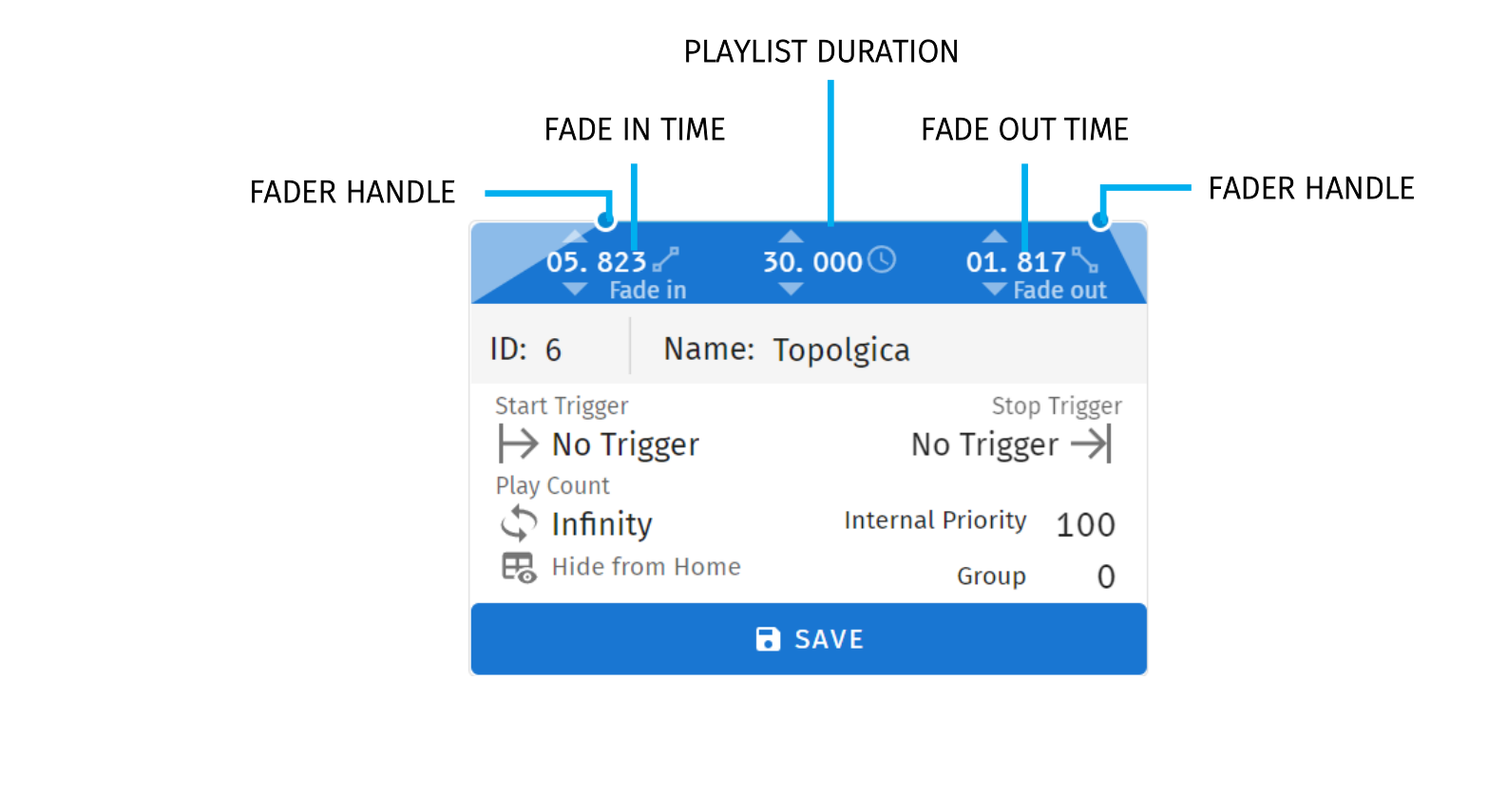
- Playlist Fader Configuration: Set the fade in and fade out time for a playlist. – Fade out time will begin once the stop command is activated over the defined duration.
- Playlist Duration: The total duration for the playlist.
- ID: Update ID of existing playlist.
- Name: Set the name of the playlist.
- Start Trigger: Options to playback this playlist either "On Power Up" or activate it using a list of triggers that are configured on the Triggers page. To utilise this feature, simply select a trigger from the dropdown menu. The playlist will start playing either by pressing the play button or by activating the chosen trigger.
- Stop Trigger: Choose from a list of triggers that are configured on the Triggers page to stop the playlist; the Playlist will stop when the trigger conditions are met.
- Play Count: Determine the number of times that the playlist will play until it stops.
- Internal Priority: When playing multiple playlists, for any conflict between channels, the playlist with higher priority will drive the output. If the playlist has the same priority the channels will merge following HTP (Highest takes precedence) method.
- Group: A group of playlists is a collection of playlists used together with the "Play one active playlist per group" option on the Settings page. This setting enables smooth fading between looks in a fixed area by ensuring that only one playlist from the group is played at a time.
- Hide from Home: Option to show or hide this playlist in Home Page.
- Save: Saves any change on the Playlist. S-PLAY NANO will ask to save any change before playing a Playlist.
Playlist Settings
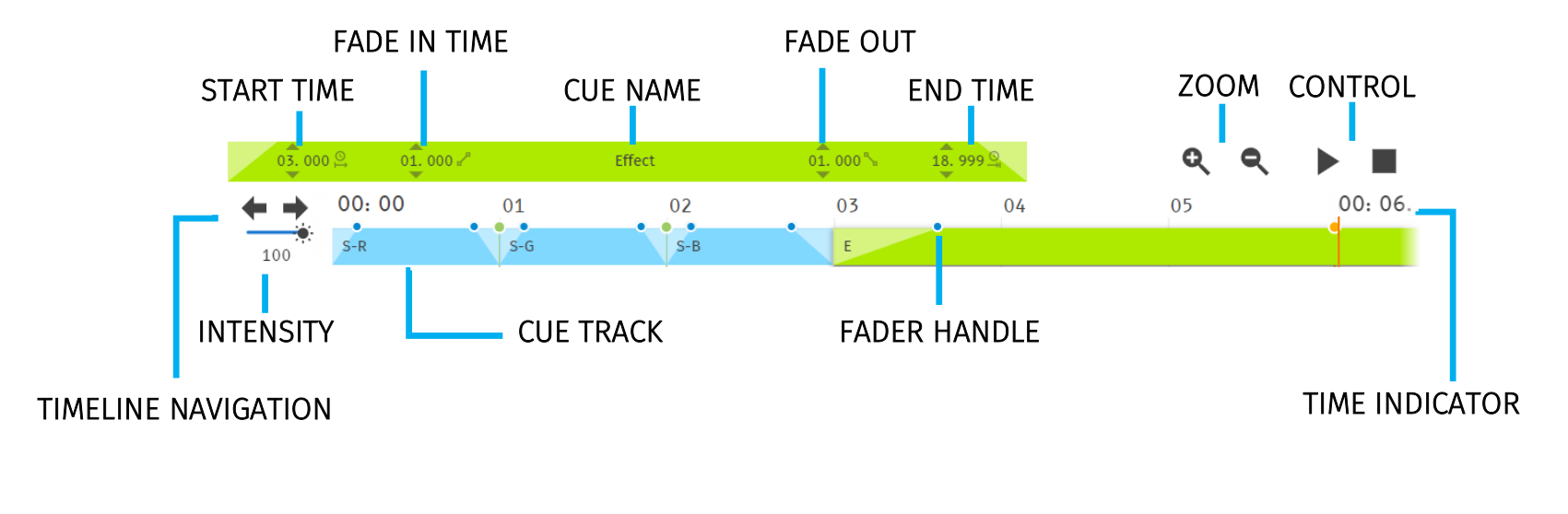
- Cue Fader Configuration: This configures start/end time, fade in/out time for a specific cue added into the cue track. The cue configuration is enabled when a cue in the cue track is selected. Fader handle is also available in the cue track for each cue for intuitive editing.
- Zoom: Zoom In and Out using the magnifying glass with the plus and minus symbol. Note that when you zoom in/out, the values in the timeline change and the size of the cue boxes change.
- Control: Gives navigation and playback over the playlist loaded in the Playlist Editor.
- Timeline Navigation: Navigate back and forward between timelines using this option. Drag the timeline to navigate back and forward.
- Intensity: Each track has its own intensity and it affects all the media on the same level.
- Cue tracks: Drag and drop media to this section. To remove a cue from the tracks, select the cue and click on the red x next to the right edge of the box.
Event and Trigger Tracks
These tracks are specifically designated for events and triggers. The vertical line indicates the precise timing at which the playlist will either pause until the trigger becomes active or execute the event. When triggers are used, the playlist will pause and maintain the last output value. To resume playback, simply activate the selected trigger or press the play button again.
Example Playlist
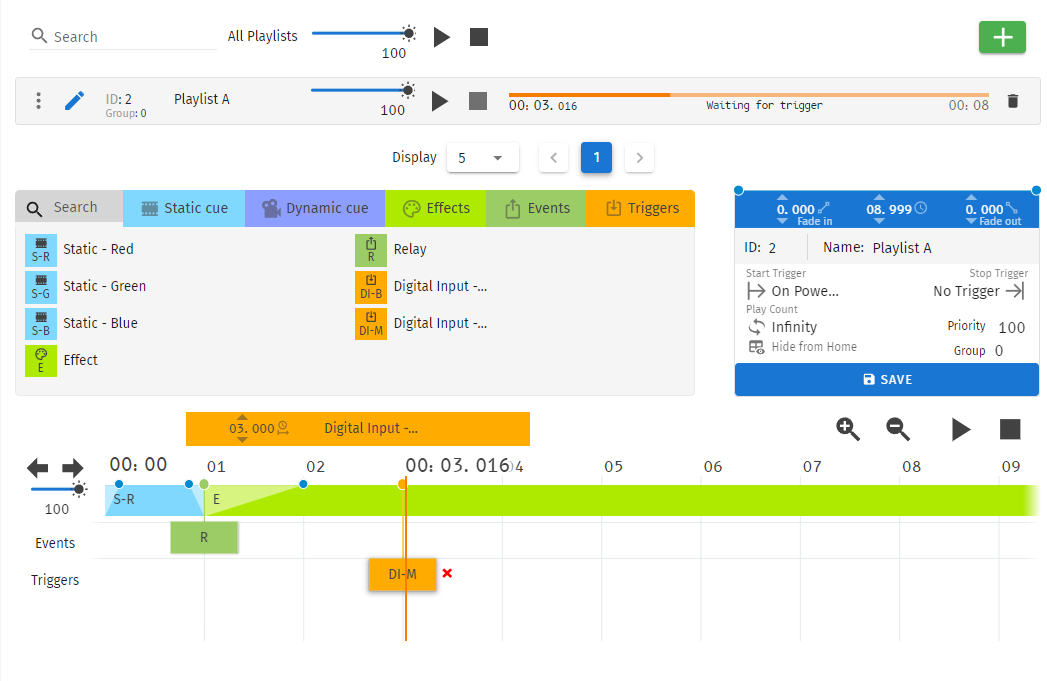
In this example, a playlist named ‘Playlist A’ is created. It is set to automatically start playing on power up and will loop indefinitely (Play Count: Infinity).
Within the playlist, there are 1 Static Cues in blue and 1 Effect cue in green that will play one after the other while simultaneously triggering Relay Event ‘R’ at the end of static cue. At the 00:03:016 mark, the playlist will pause and wait for a digital input trigger (DI-M) to be received before resuming the playback of the effect, which will continue till the end of the playlist. It will loop back and replay the sequence.
Storage
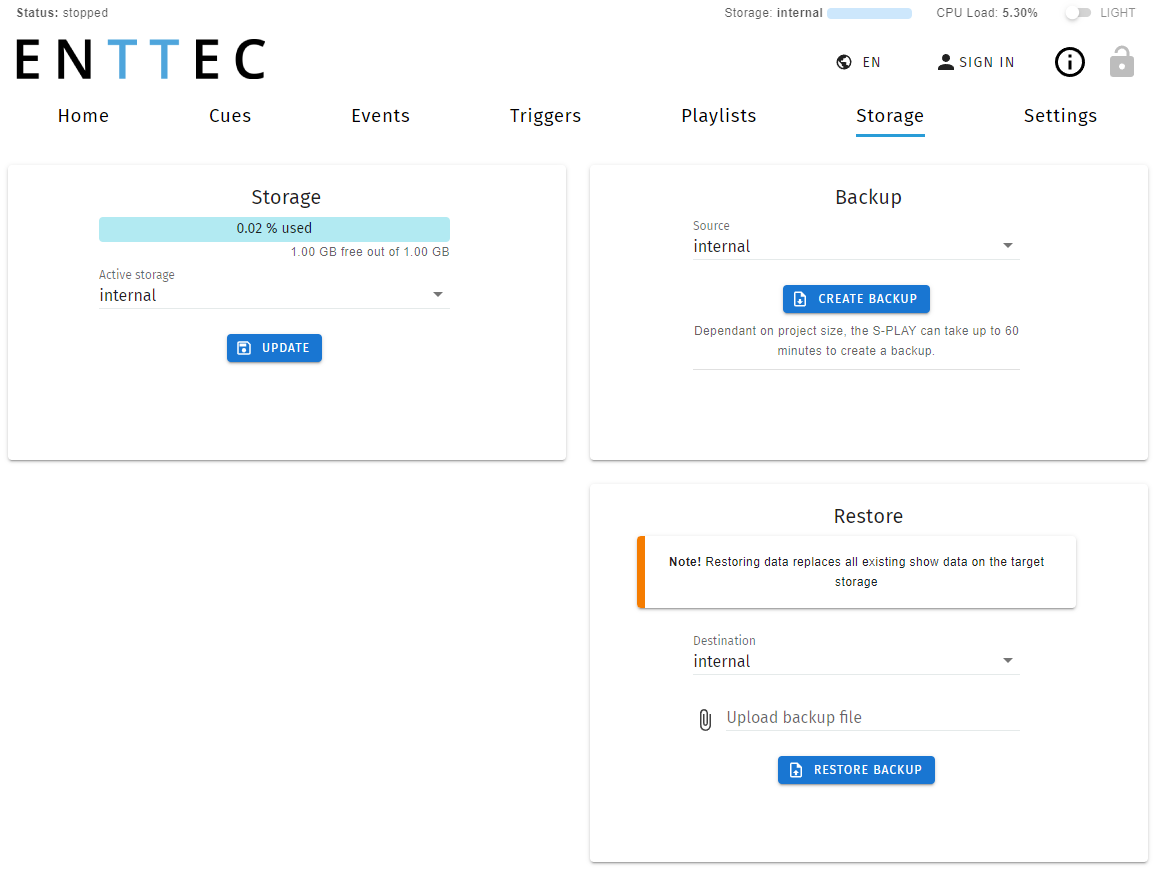
The storage page allows the user to achieve the following:
- View the internal system storage use / capacity.
- Create Backup files.
- Restore from a backup file in the computer. (Note: restoring a backup will erase the current shows on your S-PLAY NANO – always backup your current configuration before restoring a backup).
Backup
The S-PLAY NANO can produce a backup package that includes all:
- Cues
- Playlists
- Settings excluding IP address.
After pressing CREATE BACKUP. The process produces a .bak package that can be downloaded and saved to any location on your computer. (Dependant on the size of your cues show size this can take up to an hour to produce and compress the backup).
Restore
Use the created .bak file to restore cues, playlists and output settings.
Navigate to the Storage Menu in the web interface, then go to Restore section.
- Select internal storage.
- Click browse and locate the
.bakfile on your computer. - Insert and click on RESTORE BACKUP.
Once the restore is complete, a confirmation message will appear.
Storage & Calculating Requirements
Static Cue
Snapshots are comprised of a single DMX frame. The maximum file size of a frame of one universe with associated metadata is 518 bytes.
Dynamic Cue
A dynamic cue can be thought of as a stream of Static Cues. To calculate the theoretical file size of a Dynamic Cue the size of a single 1 universe DMX frame (518 bytes) should be multiplied by the quantity of frames being recorded per second and duration of recording (in seconds).
((518 bytes) * (Frames per Second [produced by the DMX source]) * (Intended Recording Length [seconds])) = Dynamic Cue Size (bytes)
Triggers & Events
Triggers and Events each have a maximum file size of 1Kb (1000bytes). To calculate the theoretical storage size all Triggers and Events your configuration will occupy, multiply the total quantity of Triggers and Events you will use by 1Kb.
((1000 bytes) * (Quantity of Triggers and Events)) = Total Trigger and Event Size (bytes)
Settings
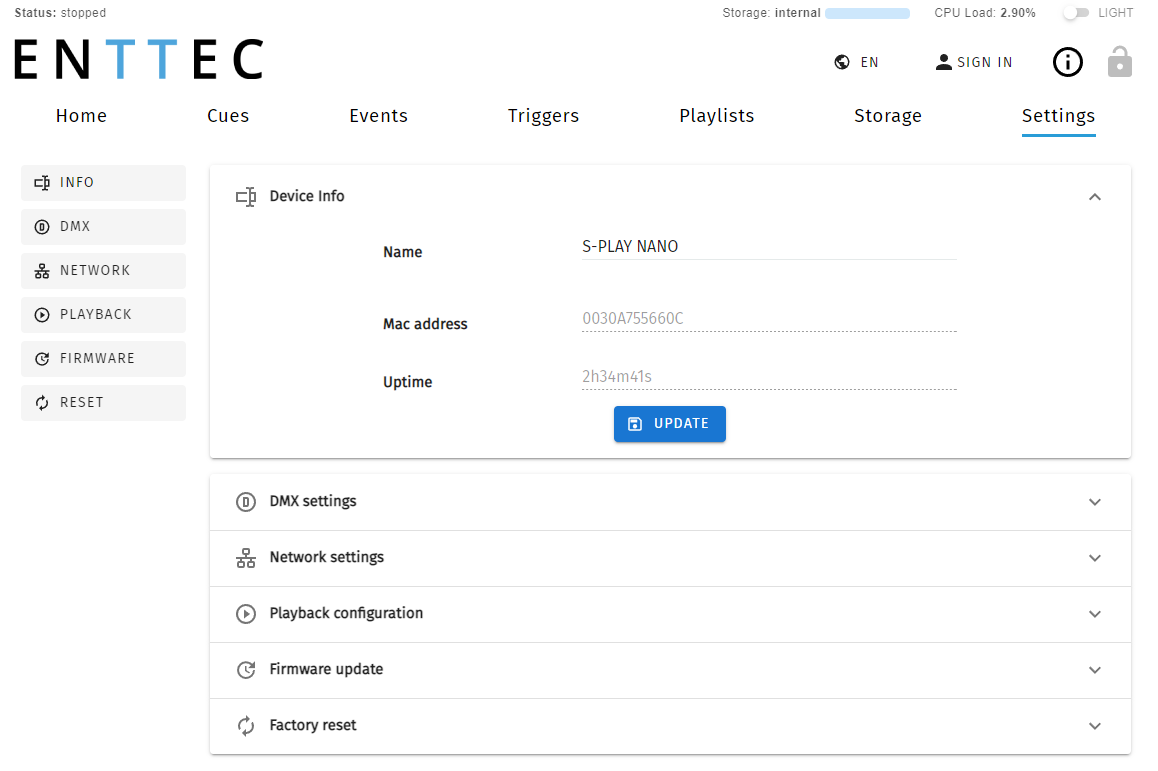
Fast navigation between each option tab can be made using the navigation menu on the left-hand side of the page.
The settings page allows the user to:
- Set the S-PLAY NANO device name to be identical on the network.
- Configure DMX output refresh rate.
- Change the S-PLAY NANO’s network configuration.
- Define the OSC and UDP input port.
- Update playback configuration.
- Send black frame on playlist stop.
- Restrict playback of one playback group at a time.
- Update firmware.
- Resume to factory defaults.
Device Info
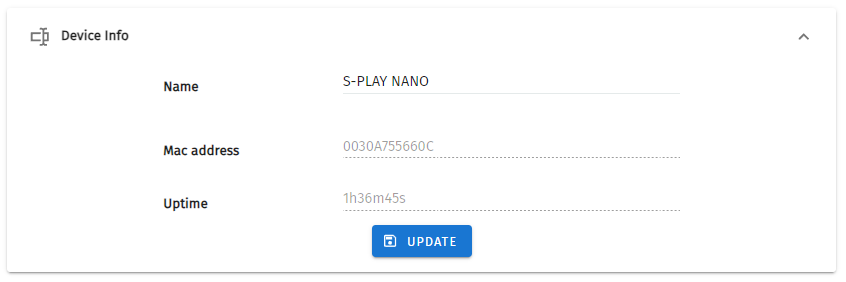
Device info allows user to set unique S-PLAY NANO name for identification. Uptime shows the time the S-PLAY NANO has been working.
DMX Settings

Provides control over DMX output frame rate.
Network Settings
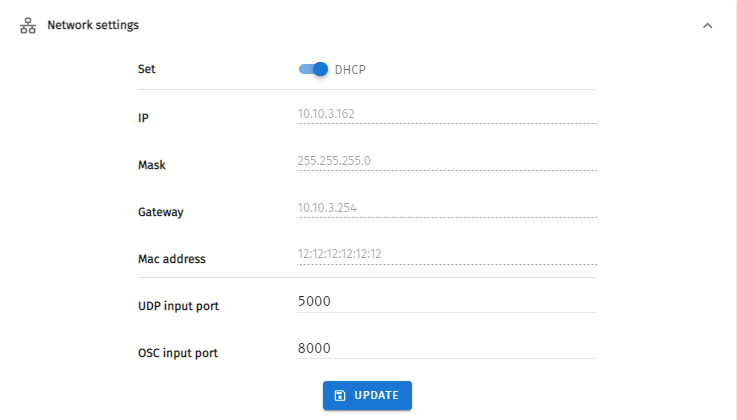
Network Settings allow a DHCP or Manual IP address to be defined. After effecting the IP changes, the S-PLAY NANO will reboot in order to initiate all services.
UDP and OSC input ports for use with S-PLAY NANO Triggers can also be defined in the Network Settings:
Default Network Settings: DHCP: Enabled; Fall Back/Static IP: 192.168.0.10; Mask: 255.255.255.0; Gateway: 192.168.0.1.
Default Ports: UDP Input Port: 5000; OSC Input Port: 8000.
Playback Configuration
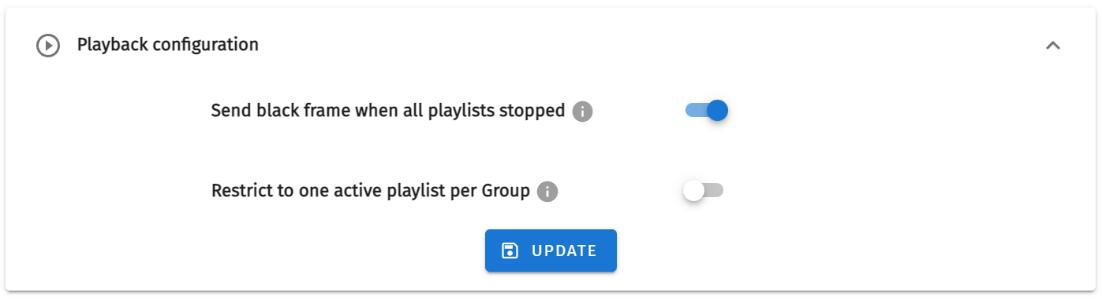
Playback configuration allows global settings to be defined.
The option to restrict to one active playlist per group stops all other playbacks in the group. All stopped playlist will obey their fade times.
Firmware Update
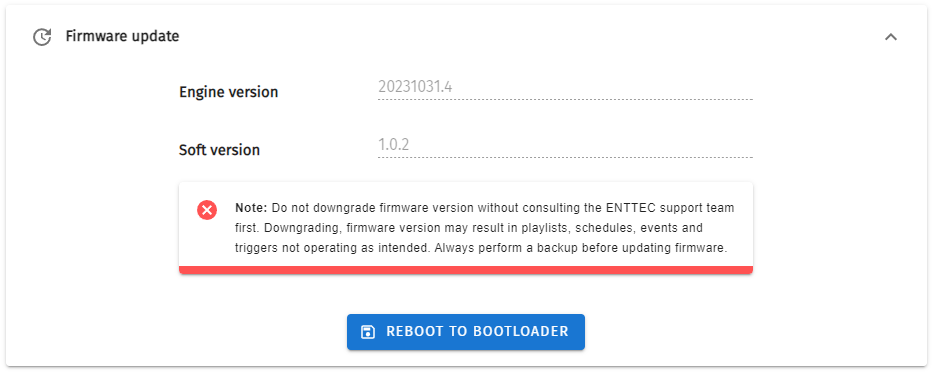
This section shows the current firmware version. Download the latest firmware from www.enttec.com. To update firmware, click the 'Reboot to Bootloader' button to access the boot page. Manually refresh the page if needed.
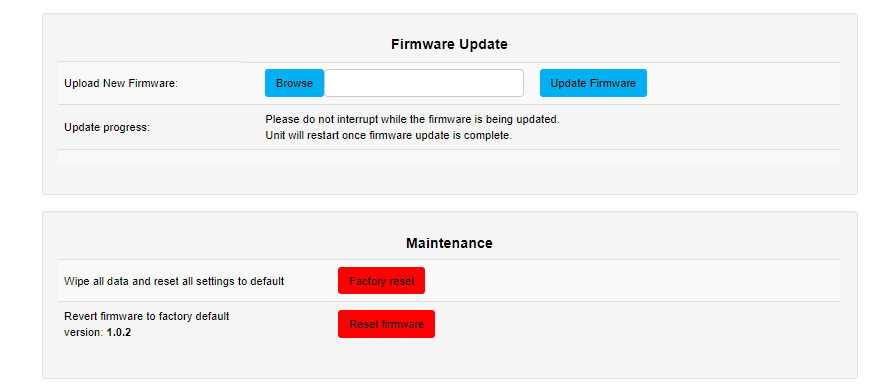
On the boot page, click the ‘Browse’ button to locate an S-PLAY NANO firmware from your computer. The firmware files are with a .bin extension. Next, click on the ‘Update Firmware’ button to begin the update. After completion, The S-PLAY NANO will restart and redirect to the Home page.
⚠️ Note: Do not downgrade firmware without consulting the ENTTEC support team first, as it may affect playlists, schedules, Events, and Triggers. Always perform a backup and a factory reset before updating firmware.
After updating firmware, power cycle your S-PLAY NANO and clear your web browser cache using ‘Ctrl’ + ‘Shift’ + ‘R’ to ensure no residual data from the previous firmware version is stored.
Factory Reset

- A factory reset can be performed using either the web interface or the reset button on the device.
- For instructions on resetting via the reset button, please consult the 'Reset Button' section of the document. To initiate a reset through the web interface, navigate to the 'Reset' option on the Settings page and click 'Factory Reset.'
⚠️ Note: It's important to note that a factory reset will erase all created content, returning the device to its original factory state.
Always take a backup before undertaking a factory reset. Factory reset cannot be stopped once initiated. Avoid powering off the S-PLAY during a factory reset.
User Management
User management can be found on the top right corner of the webpage. This is where users can Lock the functions, Monitor DMX current, login to users account and switch languages between English and Chinese.

Monitor DMX Current
S-PLAY NANO allows the user to monitor DMX current for all universes at real time. By clicking, an overview of each universe current setting will appear at the bottom page.
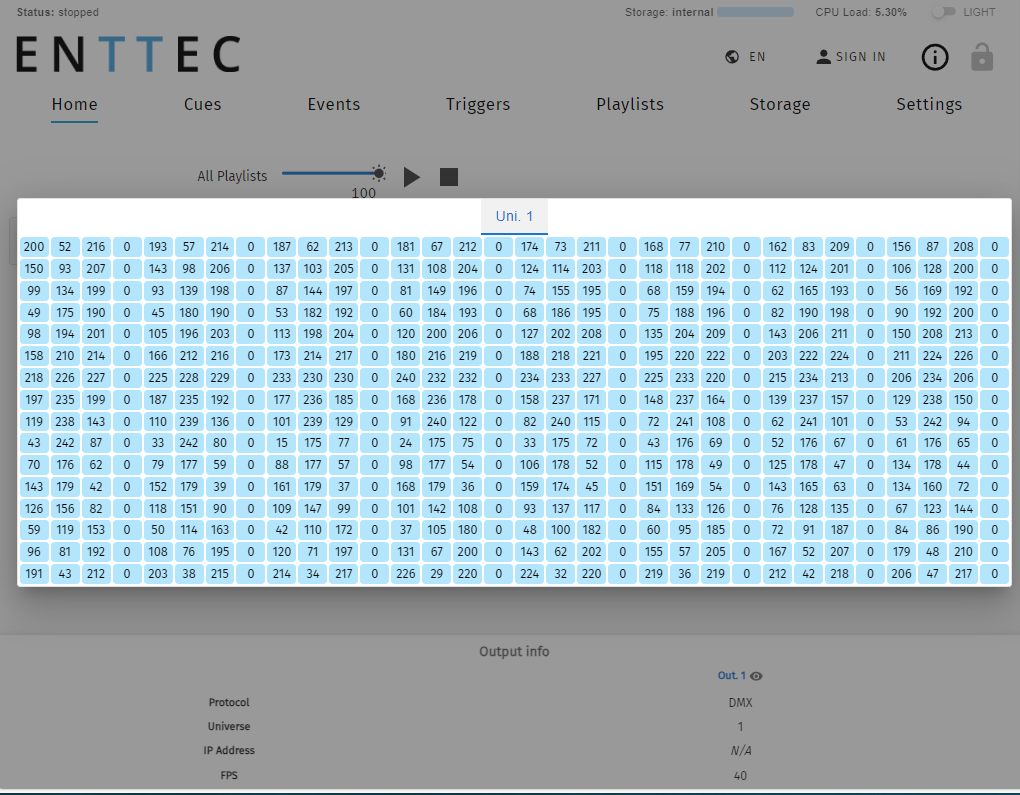
Simply click next to each output, to view the current DMX value of the universe. The current DMX value will be shown in the window as below.
Lock Feature
S-PLAY NANO includes a locking system to prevent settings, playlists, and cues from being modified.
By default, the S-PLAY NANO is unlocked, allowing any computer within the network to modify settings, create cues, generate playlists, and trigger playlist actions.
Sign in to access this feature using default login details provided in this document. To lock the unit, simply click on the padlock located in the top right-hand corner of the user interface. When not signed in, the unit will display only the home page with all the functional tabs hidden.
When the S-PLAY NANO is locked, users can:
- Play and stop any/all playlists.
- Adjust playlist intensity.
To unlock full functionality the user account must be logged in.
When a user is logged in, the unit can remain locked for the rest of the users accessing from other locations/browsers on the network. However, the unit will ensure that only one browser is open at the same time when accessing "Home", "Cue Library" and/or "Playlist Page". This is to avoid having conflicting commands that can jeopardise any part of the recording process.
To unlock the S-PLAY NANO, simply click on the padlock icon on the top right corner of the web interface.
Default Login and Password
| User | Default Password |
|---|---|
| user | 123456 |
⚠️ Note: Before setting a password take a full backup of your show data and settings.
If the password is forgotten or lost, returning the password to default can be achieved through a full factory reset by reset button or through ENTTECT EMU Software.
⚠️ Servicing, Inspection & Maintenance
- The device has no user serviceable parts. If your installation has become damaged, parts should be replaced.
- ⚡ Power down the device and ensure a method is in place to stop the system from becoming energised during servicing, inspection & maintenance.
Key areas to examine during inspection:
- Ensure all connectors are mated securely and show no sign of damage or corrosion.
- Ensure all cabling has not obtained physical damage or been crushed.
- Check for dust or dirt build up on the device and schedule cleaning if necessary.
- Dirt or dust buildup can limit the ability for a device to dissipate heat and can lead to damage.
The replacement device should be installed in accordance with all steps within the installation guide.
To order replacement devices or accessories contact your reseller or message ENTTEC directly.
Cleaning
Dust and dirt build up can limit the ability for the device to dissipate heat resulting in damage. It’s important that the device is cleaned in a schedule fit for the environment it is installed within to ensure maximum product longevity.
Cleaning schedules will vary greatly depending on the operating environment. Generally, the more extreme the environment, the shorter the interval between cleaning.
⚠️ Before cleaning:
- ⚡ Before cleaning, power down your system and ensure a method is in place to stop the system from becoming energised until cleaning is complete.
- Do not use abrasive, corrosive, or solvent-based cleaning products on this device.
- Do not spray device or accessories. The device is an IP20 product.
To clean an ENTTEC device, use low-pressure compressed air to remove dust, dirt and loose particles. If deemed necessary, wipe the device with a damp microfiber cloth.
A selection of environmental factors that may increase the need for frequent cleaning include:
- Use of stage fog, smoke or atmospheric devices.
- High airflow rates (i.e., in close proximity to air conditioning vents).
- High pollution levels or cigarette smoke.
- Airborne dust (from building work, the natural environment or pyrotechnic effects).
If any of these factors are present, inspect all elements of the system soon after installation to see whether cleaning is necessary, then check again at frequent intervals. This procedure will allow you to determine a reliable cleaning schedule for your installation.
Package Contents
- S-PLAY NANO (70095)
- Din Clip x 2pcs + screws x 4pcs
- Read Me Card
Ordering Information
For further support and to browse ENTTEC’s range of products visit the ENTTEC website.
| Item | Part No. |
|---|---|
| S-PLAY NANO | 70095 |
| S-PLAY MINI | 70093 |