We are often asked whether the Storm 10, or another ENTTEC Art-Net or sACN node, is "gigabit compatible". The short answer is yes: it works on any gigabit network and plugs straight into a gigabit switch. Its own Ethernet port runs at 100 Mbps (10/100Base-T), and for a lighting node that is not a limitation. In most installations it is actually the more reliable choice. This article explains why.
Short answer
- It works on gigabit networks. The switch talks to the Storm 10 at 100 Mbps and to everything else at full speed. Nothing else on the network slows down.
- 100 Mbps is far more than a node needs. Even 40 universes (the Storm 10's maximum, in Overdrive mode) use under a fifth of a 100 Mbps link.
- 100 Mbps is more forgiving of cabling. It uses two of the four pairs in the cable. Gigabit needs all four pairs in perfect condition.
A slow device does not slow down the network
A common worry is that putting a 100 Mbps device on a gigabit network drags the whole network down to 100 Mbps. That is not how modern Ethernet works. Every switch port negotiates its speed independently with the device plugged into it (this is called auto-negotiation). The switch receives each packet, stores it briefly, and sends it on at whatever speed the destination port is running.
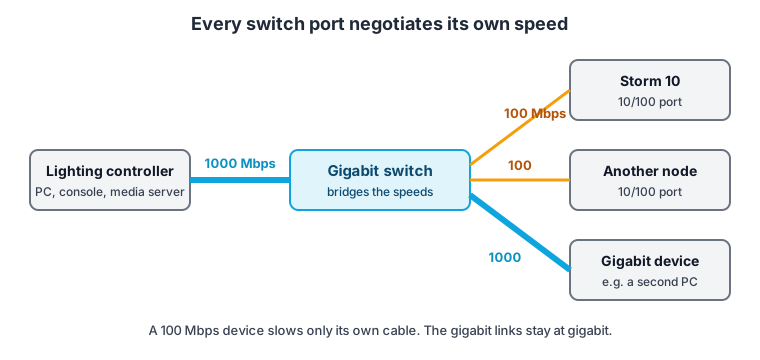
So your lighting controller, media server or computer can sit on a gigabit port running at gigabit speed, while the Storm 10 sits on its own port at 100 Mbps. The only link that runs at 100 Mbps is the cable between the switch and the Storm 10, and that link only ever carries the Storm 10's own traffic.
The one thing that would genuinely slow everything down is an old Ethernet hub, which shares one speed across all ports. Hubs have not been sold for many years; if you are using a switch, this does not apply.
It is not a capacity issue
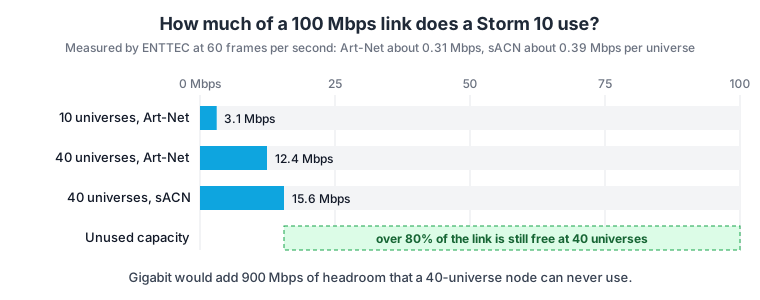
DMX data is small. ENTTEC measured Art-Net and sACN on a wired network at 60 frames per second, faster than DMX itself refreshes, and recorded about 0.31 Mbps per universe for Art-Net and 0.39 Mbps per universe for sACN (full method in Networking: Bandwidth Planning). Applied to a Storm 10:
| Universes | Art-Net | sACN | Share of a 100 Mbps link |
|---|---|---|---|
| 10 (Storm 10 standard) | about 3.1 Mbps | about 3.9 Mbps | under 4% |
| 40 (Storm 10 Overdrive) | about 12.4 Mbps | about 15.6 Mbps | under 16% |
A gigabit port on a node like this would add 900 Mbps of capacity that it can never use. The node's processor and its DMX outputs set its limit long before the Ethernet link does.
Why 100 Mbps is often the better choice
Gigabit is not just a faster version of 100 Mbps; it works differently on the cable, and that matters on real-world installs.
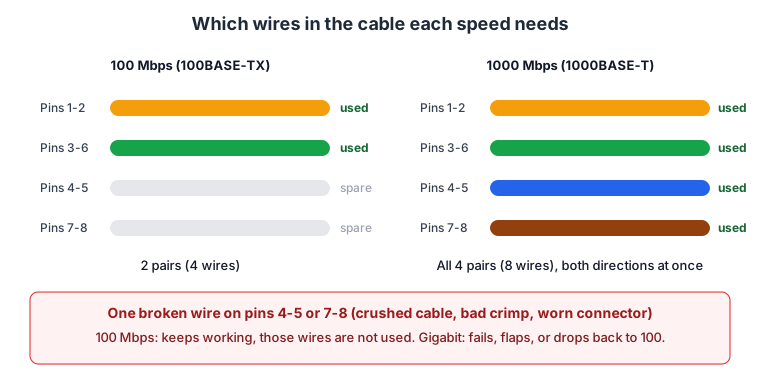
- Fewer wires have to be perfect. 100 Mbps Ethernet (100BASE-TX) uses two pairs: one to send, one to receive. Gigabit (1000BASE-T) uses all four pairs, sending and receiving on every pair at the same time. A single damaged conductor, a bad crimp or a worn connector on one of the "spare" pairs has no effect at 100 Mbps, but will stop a gigabit link from coming up, or make it drop in and out.
- More tolerance on long and imperfect runs. Both standards are rated to 100 metres on Cat5e or better. Gigabit runs its signal much closer to the limits of the cable, so it is more sensitive to cable quality, interference, and runs that are close to (or over) that length. On marginal cabling, 100 Mbps will usually keep running cleanly where gigabit starts producing errors.
- Touring and temporary cabling takes a beating. Cables that are rolled, stepped on, driven over and re-terminated in the field are exactly where one pair fails first. A 100 Mbps node keeps outputting DMX on a cable that would leave a gigabit device offline.
In short, for a device that only needs a few megabits per second, 100 Mbps gives you the bandwidth you need with a wider safety margin.
When gigabit does matter
- The controller. The computer, console or media server sending the data carries the traffic for every node, so it should be on a gigabit port. A rig of hundreds of universes from one source can exceed 100 Mbps at the controller even though each node needs very little.
- Links between switches. Uplinks between switches carry the combined traffic of everything behind them, so they should be gigabit. See Networking: Chaining Network Devices.
- Art-Net broadcast on large rigs. In broadcast mode, every universe on the network is delivered to every port, including the Storm 10's, whether it needs that data or not. On large rigs, switch your controller to unicast so each node only receives its own universes. This is explained in Art-Net network design: unicast vs broadcast, IP addressing and switches.
Practical tips
- Leave the switch port on auto. Do not force the switch port to a fixed speed or duplex. If one end is forced and the other is on auto, you can end up with a duplex mismatch, which causes dropped packets and erratic output that is hard to diagnose.
- Check the link lights. Many switches show link speed by LED colour. A node showing 100 Mbps is correct; it is not a fault.
- Use PoE if you want to. The Storm 10 can be powered by PoE from a PoE switch, and this works the same whether the switch's ports are gigabit or not. See Networking: PoE (Power over Ethernet).
- A gigabit device that keeps falling back to 100 Mbps elsewhere on your network is a sign of a cabling fault on one of the pairs. Re-terminate or replace that cable.