Resolume Arena can drive real lights: the same composition you are pixel-mapping onto LED screens can run DMX fixtures and pixel tape, and the route there is your network, not USB. This guide covers why Arena requires an Art-Net node, which ENTTEC node fits which rig, how to set up the output in Arena using Resolume's own terminology, and the network habits that keep 30+ universes arriving on time.
Why Arena needs Art-Net hardware, not a USB dongle
If you have never touched lighting hardware, here is the one concept you need: a DMX universe is 512 control channels sent down one cable, and every fixture on that cable listens to some slice of them. Art-Net is simply DMX wrapped in ordinary network packets, so one Ethernet cable out of your laptop can carry many universes at once. Our Art-Net explainer has the background.
If you are coming from Arena 5 with a USB DMX interface, stop before you upgrade. The "A word on DMX USB devices" section of the Arena manual's DMX chapter (resolume.com/support/en/dmx, v7.22, retrieved July 2026) states: "Resolume Arena 6 and up do not support Enttec DMX USB devices. If you'd like to use an Enttec DMX USB device, your only option is to stick with Arena 5." The reasoning: every USB DMX manufacturer uses its own proprietary protocol, and "USB boxes are limited to 1 or 2 universes", which the manual dismisses as "not nearly enough when you get serious with LED strips". Art-Net is the committed path instead: "if your device supports Art-Net, it will work in Resolume. Always and forever."
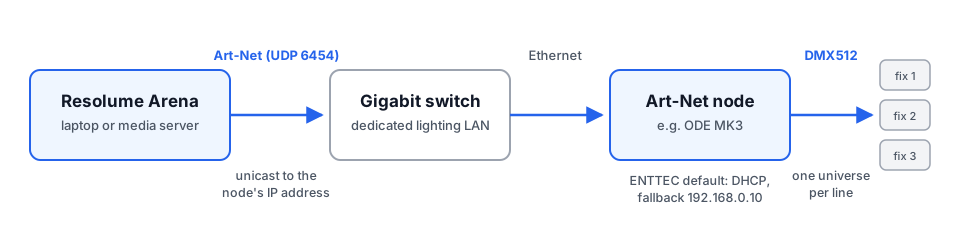
So the hardware you are shopping for is an Art-Net node: a box that receives Art-Net on its network port and outputs either DMX (for fixtures with DMX inputs) or SPI pixel data (for addressable LED tape and dots, which do not speak DMX). Nodes need no drivers, which is exactly why Resolume prefers them. Our compatible software list covers the many other applications that output Art-Net.
Picking the node for your rig
The right node depends on what is at the far end of the cable. Capacities below are from the current enttec.com product pages (checked July 2026); the older Storm 8 and Storm 24 you may see referenced in forums are no longer sold, and the Storm 10 is the current multi-universe gateway.
| Rig | Node | What it does |
|---|---|---|
| 1 to 2 universes of DMX fixtures (moving heads, dimmers, small club rig) | ODE MK3 | Two universes of bidirectional Art-Net/sACN to DMX on 5-pin XLR, with RDM, powered by PoE (802.3af) or 12-24V DC. The natural first node for a VJ adding real fixtures. |
| Multi-universe DMX rigs (larger fixture counts, distributed drops) | Storm 10 | Ten universes of Art-Net/sACN/ESP to DMX/RDM on ten outputs plus two front-facing ports, per-port configurable, PoE or DC, rack-mountable. |
| LED pixel tape or dots driven directly | OCTO MK3 | Converts up to 32 universes of Art-Net/sACN to SPI pixel data (up to 5,440 RGB or 4,096 RGBW pixels), ports configurable up to four data outputs, over 20 SPI strip types (WS2812B, SK6812, APA102 and others). Accepts 5-60V DC, so it can share the tape's own power supply. |
| Large pixel arrays far from the controller | Pixelator Mini MK2 + PLink Injectors | The Pixelator Mini MK2 takes up to 128 universes of Art-Net/sACN and sends them out over 16 ports as PLink, ENTTEC's long-distance pixel data format, over standard Cat5e/Cat6 up to 300 m. Each run terminates in a PLink Injector, which converts PLink to SPI right next to the tape (fixtures up to 3 m away) and passes fixture power through at the same point. |
One clarification, because the naming trips people up: PLink is not a protocol Arena speaks. Arena always sends Art-Net; PLink is the last-mile transport between a Pixelator and its injectors, and exists because raw SPI degrades within a few metres of cable. Injectors pair with the Pixelator Mini family only, not OCTO or DIN PIXIE.
For universes, ports and addressing on the node side, see how a converter node works and how to set one up.
Setting up the output in Arena
Everything below uses the concepts as the Arena manual defines them (DMX and Fixture Editor chapters, retrieved July 2026).
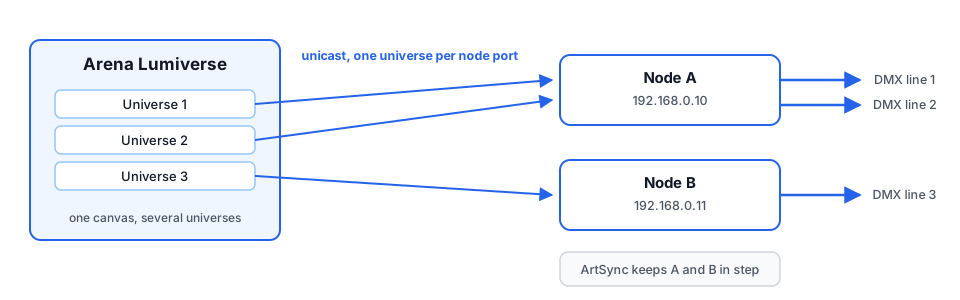
- Create a Lumiverse. In Advanced Output, add a DMX Lumiverse via the + menu. The manual defines a Lumiverse as "basically a set of DMX universes, except it only exists virtually, within Arena", and is careful to note that "Lumiverses are not a common DMX term", so do not expect your lighting tech to know the word. You use it to arrange your fixtures so the pixel map can be built at home and assigned to the real node at showtime.
- Define your fixtures. Pick a fixture preset from the dropdown, or click the gear icon next to it to open the Fixture Editor and build your own: pixel dimensions (a 16-pixel strip is width 16, height 1), colour space (RGB, RGBW and others), distribution (how the pixels "snake" through the fixture), plus any dummy channels the fixture reserves for built-in features.
- Match the input canvas to the physical layout. Fixtures on a Lumiverse sample your composition like slices on a screen: per the manual, you need to match the input size and position against your other stage elements, such as projection surfaces or LED wall tiles. Arrange the input rectangles to mirror where the fixtures physically hang, so content sweeping left to right on screen sweeps left to right across the room.
- Point the output at the node. Right-click the Lumiverse and Arena lists the Art-Net nodes it detects on the network; pick yours and it fills in the IP and universe numbers. For manual control, choose IP Address from the Target IP dropdown and unicast to the node directly. ENTTEC gateways ship with DHCP enabled and fall back to a static 192.168.0.10 (netmask 255.255.255.0) when no DHCP server answers, per the ODE MK3 manual. On a router-less lighting network that fallback is the address you will reach it on, so put your computer on the same subnet: see changing your IP on Windows or macOS. Then match the universe numbers in the node's web interface to Arena's.
- Let Auto Span do the maths. Auto Span, on by default, "expands the amount of universes in a lumiverse when you use more than 512 channels": drop a 300-pixel RGB strip (900 channels) into a Lumiverse and Arena grows it to two universes rather than forcing you to split the strip by hand. Its companion toggle, Align Output, stops individual pixels being split across a universe boundary, which most hardware requires; leave it on.
- Enable ArtSync when running several nodes. Without it, each node displays data the moment its packets arrive, and a big pixel wall fed by multiple nodes can visibly tear. With ArtSync, as the manual describes it, receivers buffer the frame, then on a single broadcast message they all display the data at the same time. The framerate and delay settings live in Arena's DMX preferences; the default 40 ms delay suits mixed lights-and-projector shows, and the manual says to set it to 0 when controlling lights only. The node must support ArtSync; all ENTTEC Ethernet hardware does.
Network practice that keeps frames smooth
Art-Net can be broadcast (every packet to every device) or unicast (each universe only to the node that needs it). Broadcast is fine for a couple of universes, but every device must receive and discard traffic it does not want, so it falls over as counts climb: nodes and switches start dropping frames, and the failure looks like random flicker rather than a clean fault. Arena's own manual draws the line: "When you start hitting 30 universes or more, it's a good idea to stop using broadcast and using gigabit switches and unicast instead" (DMX chapter, retrieved July 2026). The full reasoning, including switch selection and addressing schemes, is in our unicast vs broadcast network design article.
Three habits worth adopting:
- Dedicated NIC for lighting. Run Art-Net on its own physical interface and switch, separate from NDI, internet, media sync or FOH comms: Art-Net has no delivery guarantees, so the only way to keep latency predictable is to keep everything else off its wire. It also makes interface selection unambiguous: the manual notes that if your nodes are on the wired network but Arena is looking on the WiFi, it finds nothing; you pick the interface in the DMX tab of the Preferences.
- Static IPs when you unicast. A DHCP lease change silently kills output to a unicast target mid-show, so pin the node to a static address on any long-lived setup.
- Gigabit everywhere on the lighting network. A single 100 Mbit link or unmanaged hub in the path becomes the bottleneck for every universe traversing it.
How many pixels fit in a universe
The number you will use constantly: a 512-channel universe carries 170 RGB pixels (3 channels each) or 128 RGBW pixels (4 channels each). A 5 m roll of 60 LED/m RGB tape is 300 pixels, so already two universes, and that count decides which node tier you buy. The full working-out is in how many pixels fit in a DMX universe.
When Arena is the wrong tool
Arena is a live-performance instrument: it assumes a computer on site, an operator, and a show that changes night to night. For a permanent or scheduled installation (a facade, a foyer that should just switch on at dusk) a laptop running Arena year-round is a fragile plan. The steadier pattern is to design the content in ELM (free to download; the Free edition outputs 2 universes, paid Professional and Architectural editions plus universe packs raise the cap; enttec.com ELM page, July 2026), then record the finished show into an S-PLAY, a standalone 32-universe recorder and show controller that runs schedules and triggers with no computer in the loop. If LED mapping is new to you, start with what is LED mapping?; an overview of S-PLAY automation shows what the hardware handles day to day. Use Arena where it shines, on stage; hand the permanent stuff to hardware built to be left alone.