The Storm 10 supports RDM (ANSI E1.20) as a gateway: it converts Art-RDM on the network side to standard RDM on each DMX port, so you can discover, configure and monitor RDM-capable fixtures from a PC. This tutorial walks through enabling RDM on the Storm 10 and then discovering and configuring fixtures with DMX Workshop, a free Windows Art-Net utility.
Before you start
- Your PC and the Storm 10 must be on the same LAN and in the same IP range. The Storm 10 uses DHCP by default and falls back to 192.168.0.10 if no DHCP server responds.
- Install DMX Workshop on your PC. It is free to download from Singularity (Artistic Licence).
- RDM discovery only works on ports whose input protocol is Art-Net, since DMX Workshop talks Art-RDM.
Step 1: Enable RDM on the output ports
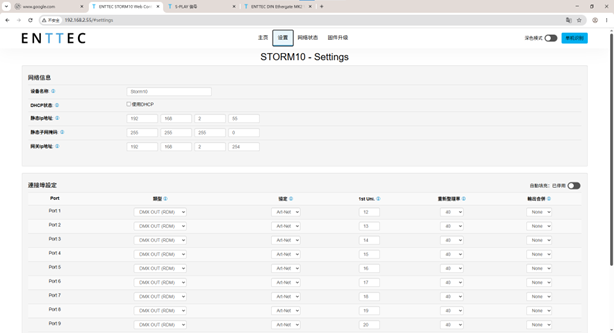
Connect the Storm 10 to your network, open its web interface in a browser (type its IP address into the URL bar), and go to Settings > Port Settings. For each port you want to use with RDM, set the port Type to DMX OUT (RDM), then save. The device takes up to 10 seconds to apply saved settings.
Step 2: Open DMX Workshop
Step 3: Select your network adapter
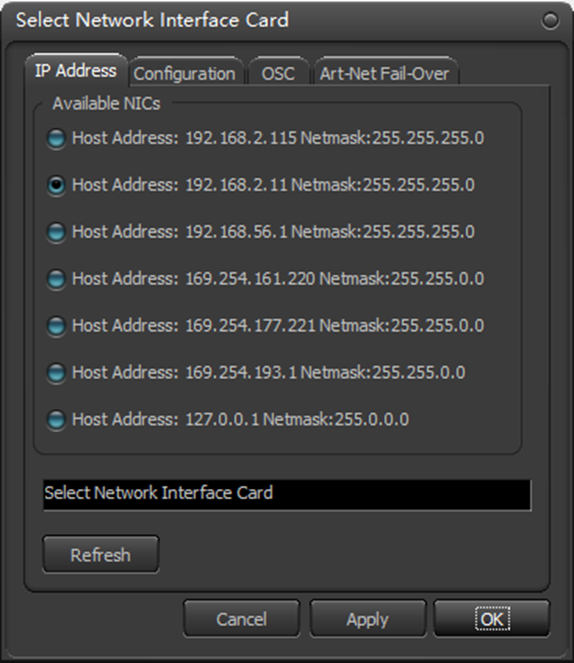
In DMX Workshop, select the network interface (NIC) your PC uses to reach the Storm 10. If the wrong adapter is selected, no Art-Net devices will be found.
Step 4: Open the Node List
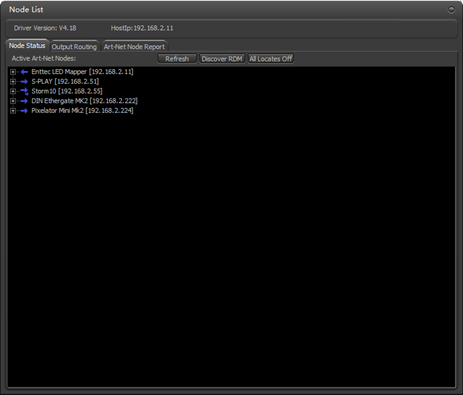
Open the Node List view. DMX Workshop polls the network and the Storm 10 appears as an Art-Net node with its enabled ports.

Step 5: Connect a fixture and let discovery run
Connect an RDM-capable fixture to one of the Storm 10 output ports you enabled in Step 1. After RDM discovery runs, the fixture appears in the Node List under that port.
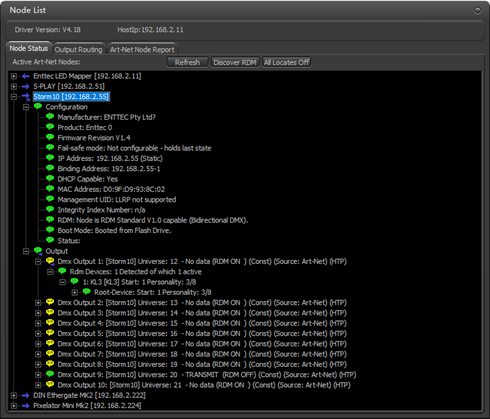
Step 6: Read and set fixture parameters
Right-click a parameter on the discovered fixture to view or change it. This is how you set the fixture's DMX start address, personality and other RDM parameters remotely, without touching the fixture's own menu.
Notes and troubleshooting
- The Storm 10 acts purely as an RDM gateway to the fixtures. Its own settings cannot be configured remotely over Art-Net; use the web interface for that.
- ENTTEC recommends disabling RDM (Type set to plain DMX OUT) on ports where your fixtures do not need it. Older fixtures built to the DMX 1990 specification can behave erratically when RDM packets are present on the line.
- The web interface Network Stats page has an Art-Net RDM section showing RDM packets sent and received, which is useful to confirm RDM traffic is actually flowing.
- If the Storm 10 does not appear in the Node List, check that the PC and device are in the same subnet and that the correct NIC is selected in Step 3.